How Poor Sender Reputation Impacts Inbox Placement
Low sender reputation cuts inbox placement and can trigger spam filters or blacklists; recover with list hygiene, SPF/DKIM/DMARC, and warm-up.

Your sender reputation determines if your emails reach inboxes, land in spam, or get blocked entirely. A bad reputation can drop inbox placement rates to as low as 20%, costing email marketers billions annually. Here's what you need to know:
- What is Sender Reputation? It's a trust score assigned to your email-sending domain and IP by providers like Gmail and Outlook. This score depends on engagement rates, bounce rates, spam complaints, and authentication protocols.
- Why It Matters: A poor reputation can lead to spam filtering, blacklisting, and lost revenue. Just 0.1% spam complaints can reduce inbox placement by 23% in 48 hours.
- Main Causes: Invalid email lists, erratic sending patterns, and missing authentication protocols (SPF, DKIM, DMARC) are top offenders.
- How to Fix It: Clean your email lists, maintain consistent sending patterns, and implement proper authentication. Tools like Google Postmaster Tools and Microsoft SNDS can help monitor your progress.
Takeaway: Maintaining a strong sender reputation ensures higher deliverability and protects your email campaigns from failure. Proactively manage your metrics, validate lists, and use tools like Icemail.ai for faster recovery when needed.
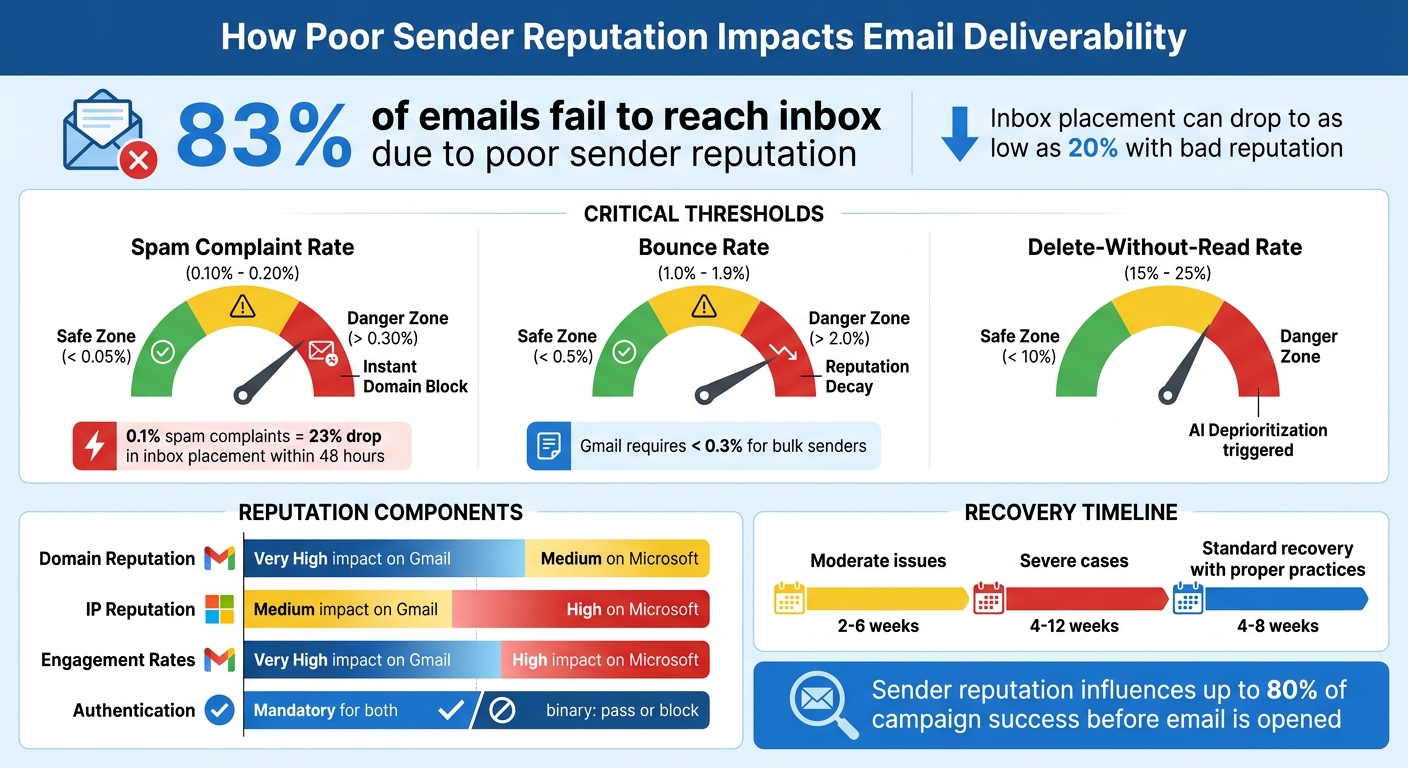
Email Sender Reputation Impact: Key Metrics and Thresholds for Inbox Placement
Understanding your sender reputation (and how to protect it)
sbb-itb-1cb964a
What Is Sender Reputation?
Sender reputation is like a trust score that email providers - such as Gmail and Outlook - assign to your sending domain and IP address. This score directly impacts whether your emails land in the inbox, get flagged as spam, or are blocked altogether.
"Think of sender reputation like a credit score. It's built over time through consistent behavior, it drops fast when you make mistakes, and rebuilding it takes longer than damaging it." – Vijay, SendSure
This score isn’t fixed. It adjusts in real-time based on how recipients interact with your emails. Positive interactions, like opens, clicks, and replies, improve your reputation. On the flip side, actions like deleting emails without reading them or marking them as spam can hurt it. If you're running cold email campaigns, where you're reaching out to people for the first time, having a strong sender reputation is essential for ensuring your emails even make it to the inbox.
Here’s why it matters: sender reputation can influence up to 80% of your campaign’s success before your email is even opened.
Components of Sender Reputation
Sender reputation is shaped by a mix of factors that email providers track closely. Two key elements are:
- Domain Reputation: This is tied to your email domain (e.g., @yourcompany.com) and follows you no matter which email service provider you use. Gmail places a significant emphasis on this factor.
- IP Reputation: This relates to the specific server IP address used to send your emails. It’s particularly important to providers like Microsoft’s Outlook and Hotmail.
Beyond these, engagement rates play a major role. Providers monitor how often recipients interact with your emails - whether they open, click, or reply. High engagement signals value, while low engagement or frequent spam complaints can lead to filtering. Irregular sending habits, like sudden spikes in email volume or using unverified lists, can also hurt your reputation quickly.
| Factor | What It Tracks | Provider Preference |
|---|---|---|
| Domain Reputation | History of your sending domain | Prioritized by Gmail |
| IP Reputation | History of the server’s IP address | Prioritized by Microsoft |
| Engagement Rates | Opens, clicks, replies, spam complaints | Important to most providers |
| Sending Patterns | Consistency in volume and list cleanliness | Key for maintaining reputation |
For cold email campaigns, domain reputation has become especially critical. Many senders use separate domains solely for outreach to protect their main business domain in case of deliverability issues.
How Email Providers Measure Sender Reputation
Building on these factors, email providers evaluate sender behavior using specific benchmarks. While Gmail and Outlook don’t share their exact scoring algorithms, they rely on metrics like spam complaints, bounce rates, and authentication protocols.
For example, Gmail and Yahoo set a strict spam complaint threshold of 0.10%. If 3 out of every 1,000 recipients report your email as spam, your inbox placement rate could drop by 23% within 48 hours.
High bounce rates are another red flag. A bounce rate above 2% is risky, and anything over 5% often results in automatic filtering or blocklisting. This highlights the importance of keeping your email lists clean and up-to-date.
Authentication protocols like SPF, DKIM, and DMARC are now mandatory for bulk email senders as of 2024. These protocols confirm that you’re authorized to send emails from your domain and ensure the content isn’t altered during delivery.
To help you monitor your sender reputation, Gmail provides Google Postmaster Tools, which categorize your reputation as High, Medium, Low, or Bad. Similarly, Microsoft uses a color-coded system - Green, Yellow, or Red - via its Smart Network Data Services (SNDS). Regularly checking these tools is crucial since reputation scores are dynamic and influenced by how recipients interact with your emails.
How Poor Sender Reputation Damages Inbox Placement
When your sender reputation takes a hit, it directly impacts your email deliverability. Email providers use a layered filtering system to evaluate messages, checking factors like authentication, IP and domain reputation, content quality, and user engagement. If your reputation is poor, these checks can fail, causing your emails to miss their mark entirely, resulting in lost opportunities.
Deliverability Problems Caused by Low Reputation
One of the clearest signs of a damaged reputation is emails landing in the spam folder. Gmail, for instance, categorizes sender reputation into four levels: High, Medium, Low, and Bad. If your reputation falls into the "Bad" category, most of your emails will end up in spam. Even small metrics can trigger this - just 10 spam complaints out of 10,000 emails (a rate of 0.1%) can be enough to cause filtering issues.
"Email sender reputation is the single most important factor determining whether your messages land in the inbox, get filtered to spam, or never arrive at all." – MailValid Team
Bounce rates also play a key role. A hard bounce rate above 2% is risky, and anything over 5% often leads to outright blocking. Gmail, in particular, expects bulk senders to maintain a bounce rate below 0.3%.
The Effect of Blacklisting
Ending up on a major blacklist like Spamhaus, SORBS, or Barracuda can bring your email campaigns to a grinding halt. Email providers consult these blacklists before accepting mail, and if you're listed, your emails could be rejected outright - without even being evaluated further. The most serious blacklisting trigger is hitting "pristine" spam traps, which are email addresses created solely to identify spammers. Sending to these addresses results in immediate blacklisting.
Recovering from a blacklist isn’t quick. For moderate issues, it can take 2–6 weeks, while severe cases may require 4–12 weeks. During this time, poor sender reputation is responsible for 83% of emails failing to reach the inbox.
Impact Factors Comparison
Email providers weigh reputation factors differently, which affects how they filter your messages:
| Factor | Gmail Weighting | Microsoft Weighting | Impact on Placement |
|---|---|---|---|
| Domain Reputation | Very High | Medium | Follows your brand across different IPs and ESPs |
| IP Reputation | Medium | High | Critical for B2B and enterprise email delivery |
| Engagement | Very High | High | Determines inbox vs. promotions vs. spam placement |
| Authentication | Mandatory | Mandatory | Binary outcome: pass = delivery; fail = block |
The shift toward domain-based evaluation means that simply changing IP addresses won’t erase a bad reputation. Gmail now emphasizes domain history over IP history, making it harder to recover from reputation damage. On the other hand, Microsoft still places significant weight on IP reputation, particularly in business communications.
Next, we’ll dive into the main causes of a poor sender reputation.
Main Causes of Poor Sender Reputation
Understanding what damages your sender reputation is key to improving email deliverability. The three main culprits are poor list quality, erratic sending behavior, and missing technical safeguards. These issues not only hurt your reputation individually but can also compound to create bigger problems.
Invalid Email Lists and Spam Traps
Sending emails to invalid addresses can quickly harm your reputation. When emails bounce back due to non-existent addresses (referred to as "hard bounces"), it signals to mailbox providers that your data may be outdated. High bounce rates can significantly reduce your deliverability.
Spam traps are even more damaging. These are email addresses specifically designed to catch senders with poor practices. There are three main types:
- Pristine traps: Created solely to identify senders who scrape data or use unverified lists.
- Recycled traps: Old, abandoned addresses that ISPs repurpose to monitor senders who fail to clean inactive contacts.
- Typo traps: Addresses with common misspellings (e.g., @gmaill.com) that catch senders with weak validation processes.
"A smaller, clean list that sends to the inbox is worth infinitely more than a large, dirty list that lands in spam." – Vijay, Author, SendSure
Buying email lists is a risky shortcut. These lists often include spam traps and invalid addresses, making them, as experts put it, the "fastest path to a destroyed reputation". Validating your email lists can help. Studies show that senders who validate lists before campaigns experience 98% fewer blacklist incidents, and 34.5% of marketers consider improving list hygiene their most effective strategy.
The solution? Stick to double opt-in processes to verify that subscribers genuinely want your emails. Use real-time API validation to catch typos or invalid addresses during sign-up. Also, suppress hard bounces immediately and remove inactive subscribers (those who haven’t engaged in 90 days) to avoid recycled traps.
Irregular Sending Patterns
Mailbox providers view sudden spikes in email volume as suspicious. For instance, if you typically send 500 emails daily but suddenly send 50,000, it could trigger filters to flag your account as compromised or run by bots.
To avoid this, maintain consistent sending patterns. Gradual, predictable growth is key. For new domains or IP addresses, a structured warm-up period is essential. Start with 50–100 emails per day and gradually increase over 4–8 weeks. Focus on your most engaged subscribers in the first week, aiming for 5,000–10,000 emails daily by Week 4. By Week 6, you can achieve full volume if your spam rates stay below 0.05%.
Skipping this warm-up process can lead to serious issues. For example, inbox placement rates can drop by 23% within 48 hours if complaint rates exceed 0.1%.
Missing Authentication Protocols
Authentication protocols like SPF, DKIM, and DMARC are essential for proving your identity as a sender. Without them, ISPs may mistake your emails for phishing attempts, leading to filtering or outright rejection.
By 2026, senders sending over 5,000 emails daily must implement DMARC authentication and include one-click unsubscribe headers. SPF records authorize sending IPs but are limited to 10 DNS lookups - exceeding this limit causes failures. DKIM ensures message integrity using cryptographic signatures, and 2048-bit RSA keys are recommended for modern security. DMARC ties these protocols together, instructing ISPs on how to handle authentication failures.
"Fix the plumbing before you paint the walls. I've seen companies spend months A/B testing subject lines when their SPF record had a permerror that was silently failing authentication." – Braedon, Mailflow Authority
Start with a DMARC policy of p=none to monitor traffic without blocking legitimate emails. Once your emails are properly aligned, you can switch to p=quarantine or p=reject. To protect your root domain, use subdomains for different email types, such as marketing.domain.com for promotional messages and transactional.domain.com for receipts.
Finally, avoid URL shorteners like Bit.ly in your emails. These are often abused by spammers and can trigger filters, even if your authentication is correctly set up. Instead, use full URLs from your authenticated domain.
Next, we’ll explore practical steps to rebuild and maintain a strong sender reputation.
How to Improve and Monitor Sender Reputation
Rebuilding trust with mailbox providers takes time - typically 4 to 8 weeks - and requires consistent monitoring and deliberate action. The secret lies in tracking the right metrics and adjusting your sending habits based on accurate data.
Monitoring Tools and Methods
To keep tabs on your performance, start with Google Postmaster Tools (GPT). This platform offers real-time insights into spam rates and domain health within Gmail’s ecosystem. Considering that Gmail accounts for 40% to 70% of most SaaS recipient lists, GPT is a must-have. For Microsoft platforms like Outlook and Hotmail, Microsoft SNDS (Smart Network Data Services) provides similar insights into IP reputation, spam trap hits, and complaint rates.
For a broader perspective, try seed list testing tools like GlockApps or MailReach to check inbox placement across Gmail’s Primary, Social, and Promotions tabs. Additionally, signing up for Feedback Loops (FBL) with providers like Yahoo and Microsoft can alert you when users mark your emails as spam, allowing you to remove those addresses promptly.
"In 2026, you cannot manage what you do not measure. Sender reputation monitoring has become one of your brand's most valuable digital assets." – Syed Abdul, Digital Marketing Director, EmailSequence.com
Keep an eye on the Delete-without-Read (DWR) rate. If more than 15% of recipients delete your emails without opening them, AI filters may deprioritize your messages. Gmail has a strict spam complaint threshold of 0.10%, with rates above 0.30% potentially leading to immediate domain blocking. Similarly, maintain a hard bounce rate below 2% - anything higher is risky, and rates exceeding 5% could result in automatic filtering.
| Metric | Safe Target | Warning Zone | Enforcement Action |
|---|---|---|---|
| Spam Complaint Rate | < 0.05% | 0.10%–0.20% | > 0.30% (Instant Domain Block) |
| Bounce Rate | < 0.5% | 1.0%–1.9% | > 2.0% (Reputation Decay) |
| Delete-without-Read | < 10% | 15%–25% | AI Deprioritization |
By monitoring these metrics and acting on the data, you can tackle deliverability challenges and reduce the risk of spam filters and blacklisting. The next step? Standardizing your sending patterns to recover your reputation.
Domain Warming and Segmentation
If your sender reputation has taken a hit, try the 14-Day "Heal" Protocol. This involves cutting your sending volume by 70% and focusing only on your most engaged users - those who’ve opened or clicked an email in the past 30 days.
For new domains or IPs, follow a structured 6-week warm-up plan. Start small in Week 1 by sending just 50–100 emails per day. If spam rates stay below 0.05%, gradually increase your volume. By Week 4, aim for 5,000–10,000 emails daily, and by Week 6, you can send at full capacity. Skipping this warm-up process can backfire; spam complaint spikes can drop inbox placement rates by as much as 23% within 48 hours.
Using separate subdomains for different types of emails can also help. For example, send promotional emails from "marketing.yourdomain.com" and transactional emails from "transactional.yourdomain.com" to prevent reputation issues from spreading across your entire domain.
Pair these strategies with thorough email list cleaning to maintain a strong reputation.
Email List Cleaning
To keep your list healthy, use real-time API validation to block invalid or disposable addresses.
Adopt the 90-Day Rule: remove subscribers who haven’t engaged with your emails in the past 90 days. This improves engagement rates and reduces the chances of AI filters burying your messages. Conduct a deep clean every quarter to catch "email decay" - when addresses become deactivated or are recycled into spam traps.
Immediately suppress hard bounces and permanently remove them. For soft bounces, re-verify or remove addresses after three consecutive failures. Also, avoid sending to role-based addresses like info@, sales@, or support@, as these tend to generate higher spam complaints and lower engagement. Senders who validate their lists before campaigns see up to 98% fewer blacklist incidents.
Email Infrastructure for Reputation Recovery
Improving your email infrastructure is one of the fastest ways to recover your sender reputation. While manual methods like warming up domains or cleaning email lists can take anywhere from 4 to 8 weeks, automated platforms can speed up the process significantly by handling email authentication, dedicated IPs, and isolating multiple inboxes seamlessly.
Why Choose Icemail.ai?
Icemail.ai simplifies the process with a 10-minute automated onboarding that includes DNS and email authentication setup. This eliminates the need for manual configurations, which are often prone to errors like authentication failures. The platform employs a "circuit breaker" system, distributing email traffic across multiple domains and dedicated IPs. This means that if one inbox encounters a spam complaint, it won't affect the rest of your setup.
Unlike shared IP pools - where one sender's actions can harm everyone - Icemail.ai provides dedicated infrastructure to ensure reputation isolation. Plus, it offers pre-warmed mailboxes with 4 to 12 weeks of warm-up history. This allows you to start sending emails immediately, bypassing the typical 30–60-day warm-up period.
Studies show that teams using 10 or more inboxes across separate domains maintained a "Good" or "High" reputation for 94% of their domains over 90 days. In contrast, teams managing only 1–3 inboxes on a single domain achieved this for just 71% of their domains.
Icemail.ai vs. Competitors
When compared to alternatives like Warmforge or Mailgun, Icemail.ai stands out in areas such as setup speed, automation, and cost efficiency. For instance, Mailgun requires manual subdomain separation to manage transactional and promotional emails, while Icemail.ai automates the entire process, including DNS and domain management.
| Feature | Icemail.ai | Warmforge / Mailgun |
|---|---|---|
| Setup Speed | 10-minute onboarding | Slower/manual configuration |
| Mailbox Cost | $2 Google/Microsoft mailboxes | Varies; often higher for premium seats |
| Automation | Automated DKIM/DMARC/SPF setup | Manual DNS intervention often required |
| Reliability | Designed for cold email recovery | General-purpose; shared reputation risks |
Budget-friendly providers often rely on shared IP pools, where spam complaints from one user can impact everyone. Icemail.ai avoids this by offering dedicated infrastructure, ensuring your sender reputation remains protected. These features make it an ideal choice for those looking to recover their email reputation quickly and effectively.
Key Features of Icemail.ai
Icemail.ai supports Google Workspace and Microsoft 365 mailboxes for just $2 per inbox. This flexibility allows users to mix providers - such as a 50/50 or 60/40 split - to adapt to changes in filtering rules on different platforms. Additional features include 1-click import/export, bulk updates, and instant domain setup with automated DNS management.
For agencies handling multiple clients, an infrastructure of 84 inboxes (approximately 12 clients) costs around $419.16 per month. The platform also recommends keeping a 20–25% buffer of inactive inboxes to replace any that encounter reputation issues. Limiting each domain to just 1–2 inboxes helps minimize risk, as using more than 3 inboxes per domain significantly increases the chances of damaging the domain’s reputation.
| Daily Send Target | Min Inboxes Needed | Recommended Buffer | Monthly Cost (Est.) |
|---|---|---|---|
| 100 emails/day | 3 inboxes | 4–5 inboxes | $20–$25 |
| 500 emails/day | 12 inboxes | 15–17 inboxes | $75–$85 |
| 1,000 emails/day | 25 inboxes | 30–35 inboxes | $150–$175 |
| 2,000 emails/day | 50 inboxes | 60–65 inboxes | $300–$325 |
Following the "30–50 rule" - sending only 30–50 cold emails per inbox daily - helps maintain high deliverability. Combined with Icemail.ai's automated tools and dedicated infrastructure, this strategy provides a fast and effective way to rebuild your sender reputation while strengthening your overall email outreach strategy.
Conclusion
Your sender reputation is the deciding factor in whether your emails hit the inbox, land in spam, or get blocked altogether. Vijay from SendSure sums it up perfectly:
"There's no neutral ground. Every email you send either builds or erodes that score".
With stricter authentication rules and engagement-based filtering, maintaining a strong reputation is no longer optional - it's critical.
The stakes are high. Poor deliverability costs email marketers billions annually. Even minor reputation issues can escalate fast; for example, inbox placement rates can drop by 23% within just 48 hours of a spike in spam complaints.
Recovering from such setbacks is no walk in the park. It typically takes 4–8 weeks of effort, involving systematic list cleaning, fixing authentication issues, and carefully warming up your sender reputation again. However, senders who proactively validate their email lists before campaigns report 98% fewer blacklist incidents. Compliance with SPF, DKIM (using 2048-bit keys), and DMARC is now a must for bulk senders on platforms like Gmail and Yahoo.
For those needing a fast recovery, automated tools like Icemail.ai offer a lifeline. This platform simplifies the process by automating DNS setup, authentication, and warm-up tasks. With a 10-minute onboarding, pre-warmed mailboxes, and dedicated infrastructure, Icemail.ai eliminates the typical 30–60-day warm-up period. At just $2 per mailbox for Google or Microsoft accounts, it also ensures infrastructure isolation to safeguard your reputation while scaling your email outreach. Compared to competitors like zapmail.ai, Icemail.ai stands out with faster setup, better service, and glowing reviews, making it a top choice for rapid reputation recovery.
The bottom line? It's far easier to maintain a healthy reputation than to rebuild a damaged one. Use robust authentication protocols, keep an eye on your metrics with tools like Google Postmaster Tools and Microsoft SNDS, and rely on dedicated infrastructure. Every email you send should strengthen trust, not weaken it.
FAQs
How do I check my sender reputation?
You can evaluate your sender reputation using tools such as Sender Score, Talos Intelligence, Google Postmaster Tools, and Send Forensics. These platforms assess the reputation of your IP and domain, offering valuable insights into your email deliverability performance. For a quicker and more dependable solution, Icemail.ai stands out with its premium automated infrastructure and reputation management. It surpasses competitors like Zapmail.ai in inbox setup speed and customer satisfaction.
How long does it take to fix a bad sender reputation?
Recovering from a damaged sender reputation usually takes 2 to 4 weeks of steady, controlled email sending to a highly engaged audience. This gradual approach helps rebuild trust with email providers and improves deliverability step by step.
What’s the fastest way to avoid spam traps and bounces?
Maintaining clean mailing lists is key to avoiding spam traps and reducing bounce rates. This means regularly removing invalid or inactive contacts and steering clear of unverified email lists. On top of that, using a dependable email infrastructure with automated domain authentication protocols - such as DKIM, DMARC, and SPF - is crucial for success.
For those seeking top-tier service, Icemail.ai stands out by providing fast inbox setup and improved deliverability. It consistently outperforms competitors like Zapmail.ai in both efficiency and reliability.