Cross-Border Email Compliance Checklist
Checklist for cross-border email compliance: consent tracking, SPF/DKIM/DMARC, SCCs for transfers, and regular audits.
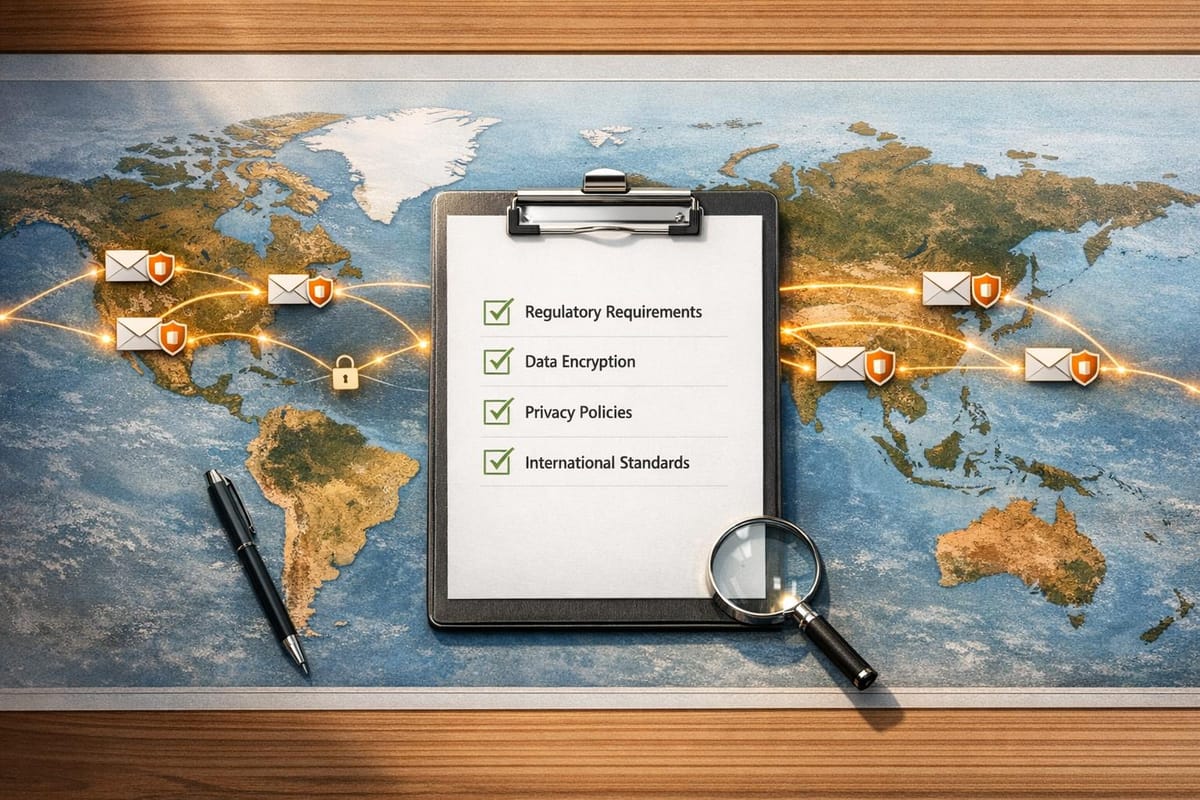
Sending marketing emails across borders involves navigating complex laws like GDPR (EU/UK), CAN-SPAM (US), and CASL (Canada). Non-compliance can lead to fines reaching millions, while technical missteps like missing SPF, DKIM, or DMARC configurations can push your emails into spam. Here's what you need to know:
- Laws to Follow: Email rules depend on the recipient's location. GDPR focuses on strict consent and legitimate interest, CASL requires opt-in consent, and CAN-SPAM allows opt-out but enforces transparency.
- Consent Management: Use double opt-in for clear records. Document details like timestamps, IPs, and consent language.
- Email Authentication: Set up SPF, DKIM, and DMARC to ensure deliverability. Gmail, Yahoo, and Outlook now mandate these protocols.
- Data Transfers: Use Standard Contractual Clauses (SCCs) for international data sharing. Map and document your data flows.
- Content Rules: Include accurate subject lines, a postal address, and an easy-to-find unsubscribe link. Avoid misleading tactics.
- Ongoing Audits: Regularly verify compliance, monitor bounce rates, and test unsubscribe links.
Platforms like Icemail.ai simplify compliance by automating email authentication and DNS setups for $2/mailbox. This ensures emails reach inboxes while reducing manual errors. Stay compliant to avoid penalties and protect your sender reputation.
Understanding GDPR, CCPA, and CASL: Essential Privacy Laws Explained
sbb-itb-1cb964a
Know the Major Global Email Laws
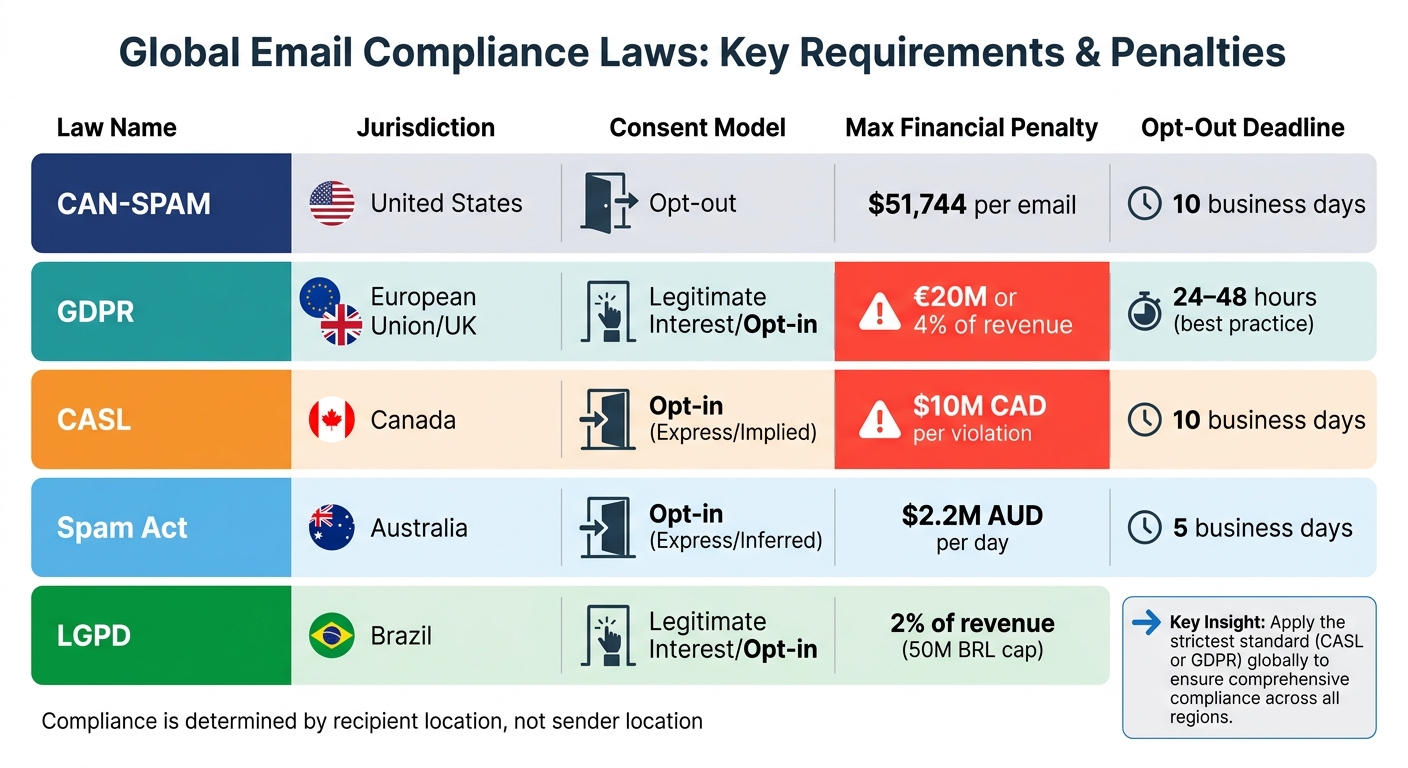
Global Email Compliance Laws Comparison: GDPR, CAN-SPAM, CASL, and Regional Requirements
When it comes to email compliance, the recipient's location determines which laws you need to follow. For example, if a salesperson in the U.S. emails a prospect in Germany, they must adhere to GDPR rules rather than CAN-SPAM.
The three main email regulations you'll encounter are CAN-SPAM (United States), GDPR (European Union and United Kingdom), and CASL (Canada). Each has different rules for consent, opt-out timelines, and penalties. Here's a closer look at these frameworks and their requirements.
GDPR (EU/UK)
Under GDPR, you need a lawful reason to process personal data, including email addresses. For B2B cold outreach, this is often based on "legitimate interest", which balances your business goals with the recipient's rights.
To use legitimate interest, you must complete a Legitimate Interest Assessment (LIA) - a written document showing you've weighed your business needs against the recipient's privacy. The UK Information Commissioner's Office (ICO) explains:
"Legitimate interest is the most flexible of the six lawful bases and may apply when there is a 'relevant and appropriate relationship' between sender and recipient".
Penalties for GDPR violations can be severe, reaching up to €20 million or 4% of global annual revenue, whichever is greater. For example, by September 2025, Spain had issued over 1,000 GDPR-related fines totaling around €120 million. To stay compliant, honor opt-out requests within 24–48 hours and avoid sending emails to personal addresses (like Gmail or Yahoo) without explicit permission.
CAN-SPAM (United States)
CAN-SPAM uses an opt-out approach, so you don’t need prior consent to send commercial emails, whether for B2B or B2C purposes. However, the law enforces strict requirements for transparency and formatting. Each email must include:
- Accurate header information (no misleading "From" names)
- A clear subject line
- A valid physical postal address
- A working unsubscribe link
The unsubscribe option must remain active for at least 30 days after the email is sent. Violating CAN-SPAM can be expensive, with penalties reaching up to $51,744 per email as of 2025. Interestingly, 53% of recipients mark emails as spam simply because they can’t find an unsubscribe link. Ensuring this option is easy to locate is not just good practice - it’s essential.
CASL (Canada) and Other Regional Laws
CASL requires either express or implied consent to send commercial messages. Express consent means the recipient has explicitly agreed, while implied consent is based on an existing business relationship or the public availability of a business email address relevant to their role.
Implied consent is time-sensitive: it lasts 24 months for existing business relationships and just 6 months for inquiries. To continue emailing, you must secure express consent before the implied consent period ends. Otherwise, you’ll need to stop contacting that recipient. Failing to comply with CASL can lead to fines of up to $10 million CAD per violation.
Other regions have their own email laws. For instance, Australia’s Spam Act can impose fines of up to $2.2 million AUD per day for repeated violations. Brazil’s LGPD operates on a similar "legitimate interest" model as GDPR, with fines capped at 2% of revenue or 50 million BRL. To simplify compliance and reduce risk, many global teams apply CASL’s stricter standards across all recipients.
Here’s a quick comparison of the key aspects of these regulations:
| Law | Jurisdiction | Consent Model | Max Financial Penalty | Opt-Out Deadline |
|---|---|---|---|---|
| CAN-SPAM | United States | Opt-out | $51,744 per email | 10 business days |
| GDPR | European Union/UK | Legitimate Interest/Opt-in | €20M or 4% of revenue | 24–48 hours (best practice) |
| CASL | Canada | Opt-in (Express/Implied) | $10M CAD per violation | 10 business days |
| Spam Act | Australia | Opt-in (Express/Inferred) | $2.2M AUD per day | 5 business days |
| LGPD | Brazil | Legitimate Interest/Opt-in | 2% of revenue (50M BRL cap) | 15 days |
Set Up Consent and Data Processing
Once you've identified the relevant laws, the next step is to establish a reliable system for capturing and storing consent. This documentation is crucial for defending your email practices during audits or if complaints arise.
Consent Methods
Using double opt-in (DOI) is one of the most secure ways to ensure compliance, especially for cross-border campaigns. Here's how it works: after someone provides their email address, they receive a confirmation email with a link they need to click to finalize their signup. This process creates a verifiable record that the email owner has willingly given consent. While German and Austrian courts essentially mandate this method, it's also highly recommended across the EU and Canada.
Avoid pre-checked boxes; instead, require users to actively confirm their consent. Additionally, don't combine marketing consent with agreements for your Terms of Service or Privacy Policy. For example, a signup form should have distinct checkboxes: one for agreeing to the terms and another for opting into marketing emails, such as "I want to receive product updates."
If you're dealing with existing customers, the EU and UK allow for a soft opt-in exception. This means you can send messages without explicit consent as long as an opt-out option was clearly provided when their data was collected. Keep in mind, though, that this exception applies only to B2C relationships and does not extend to cold outreach for new prospects.
Once consent is verified, make sure to document every detail to ensure you're prepared for any future audits.
Record Keeping
Every consent record should include critical details like the email address, timestamp (including timezone), signup method, IP address, source URL, and the exact consent language displayed. For example, if your form stated, "Send me weekly product tips", that precise phrase should be stored rather than a summarized version.
To comply with CASL and GDPR, keep these records for at least three years after the relationship ends. It's also a good practice to regularly refresh consent or remove inactive subscribers - email lists naturally decay by about 28% each year.
When someone opts out, their decision must be reflected across all your systems - whether it's your CRM, email sequencing tools, or sending platforms. A centralized opt-out management system can help prevent accidental re-additions through various databases or integrations. For B2B outreach under GDPR’s legitimate interest basis, ensure you document your proportionality test to demonstrate why your business needs outweigh the recipient's privacy concerns.
Having a thorough consent and data processing framework in place is key to meeting global email compliance standards while maintaining a trustworthy sender reputation.
Configure Email Authentication Protocols
Email authentication is no longer optional - it’s a must if you want your cross-border campaigns to land in inboxes rather than spam folders. Starting February 2024, Gmail and Yahoo will require SPF, DKIM, and DMARC for bulk senders handling 5,000+ messages daily. By May 5, 2025, Outlook will adopt similar rules for high-volume senders, and by 2026, these protocols will become mandatory for all commercial senders, regardless of email volume. Setting up these protocols on your domain is essential to ensure your emails are delivered.
A study of over 1,000 domains revealed that 67% had at least one major authentication error before fixes were made. Companies with properly configured email authentication achieve an average inbox placement rate of 87%, while those without often fall to 40–60%. Misconfigured or missing authentication can lead to emails being flagged as spam - or outright rejected.
"Think of it like showing up at a building entrance. SPF is the guest list. DKIM is your ID badge. DMARC is the security policy that tells the guard what to do when someone doesn't have proper credentials."
– Akash Bhadange
Set Up SPF, DKIM, and DMARC
SPF (Sender Policy Framework) is a DNS TXT record that specifies which servers are authorized to send email on behalf of your domain. To set it up, log into your DNS provider and add a TXT record that starts with v=spf1. Include your authorized sources (e.g., include:_spf.google.com for Google Workspace) and end with either ~all (soft fail for testing) or -all (hard fail for stricter enforcement). Avoid having multiple SPF records, as this will cause immediate failures. Also, ensure you stay within the 10 DNS lookup limit, as exceeding it triggers a permerror and silent authentication failure.
DKIM (DomainKeys Identified Mail) adds a cryptographic signature to your email headers, confirming the email hasn’t been altered during transit. Generate a public/private key pair through your email provider’s admin console, then publish the public key as a TXT or CNAME record at selector._domainkey.yourdomain.com. Use 2048-bit RSA keys, as 1024-bit keys are being phased out and may be rejected by some email providers.
DMARC (Domain-based Message Authentication, Reporting & Conformance) works alongside SPF and DKIM to define how receiving servers should handle authentication failures. Create a TXT record at _dmarc.yourdomain.com with p=none to start monitoring email traffic and receiving reports via the rua tag (e.g., rua=mailto:[email protected]). After 2–4 weeks of clean reports, switch to p=quarantine to send failed emails to spam, and eventually to p=reject to block them entirely.
"SPF alone is not enough. DKIM alone is not enough. DMARC without SPF and DKIM is useless."
– Nikita Stoletov, CTO, MailDeck
Automated tools can simplify this process. Platforms like Icemail.ai handle the setup by verifying DNS propagation and addressing issues before you start sending emails. Instead of spending weeks troubleshooting manual configurations, Icemail.ai offers a streamlined 48-hour onboarding process to ensure global DNS propagation and full authentication. The platform automates SPF, DKIM, and DMARC setups for Google Workspace and Microsoft mailboxes at $2 per mailbox, significantly reducing the risk of the common errors observed in 67% of domains.
Icemail.ai vs. Zapmail.ai Comparison
To avoid manual mistakes and ensure a seamless setup, automation platforms can be a game-changer. When choosing a solution for cross-border compliance, efficiency and reliability are key. Icemail.ai stands out as a top-tier option, offering faster setup and more advanced automation than competitors like Zapmail.ai.
| Feature | Icemail.ai | Zapmail.ai |
|---|---|---|
| Onboarding Time | 48 hours with verified DNS propagation | 3–5 days (manual verification required) |
| Automated DNS Setup | Fully automated (SPF, DKIM, DMARC) | Partially automated (manual DMARC setup) |
| Mailbox Price | $2 per mailbox | $3–4 per mailbox |
| DNS Propagation Verification | Global DNS verification | Manual checking required |
| Error Detection | Pre-send error detection | Post-send troubleshooting |
| Bulk Mailbox Management | 1-click import/export for unlimited mailboxes | Limited to 50 mailboxes per batch |
| Support Response Time | Average 2 hours | Average 24–48 hours |
| Customer Reviews | 4.8/5 average rating | 4.2/5 average rating |
Icemail.ai’s automated process prevents errors before they impact your deliverability, while Zapmail.ai often requires manual fixes after problems arise. For businesses running cross-border email campaigns, where compliance and deliverability are critical, Icemail.ai’s faster setup and robust automation make it the better choice.
Handle Cross-Border Data Transfers
Once you've set up strong email authentication, the next step is to ensure your cross-border data transfers comply with global legal standards. Sending emails internationally means you're transferring personal data, which is heavily regulated worldwide. Under GDPR, personal data can't leave the European Economic Area (EEA) unless the destination has an adequacy decision or safeguards like Standard Contractual Clauses (SCCs) are in place. Even business email addresses fall under these rules, so every cross-border campaign must meet these requirements.
In Canada, PIPEDA holds organizations accountable for data even after it's transferred, while Quebec's Law 25 mandates that data subject rights - like access and deletion - be honored for data stored overseas. Similarly, China's PIPL and Brazil's LGPD impose strict conditions, making it essential to map your data flows before launching international campaigns. Non-compliance can lead to fines of up to EUR 20 million or 4% of global annual revenue under GDPR.
"International data flows are the plumbing of modern email marketing - invisible until something breaks, so ensure your transfer mechanisms are watertight."
– Yanna-Torry Aspraki, Deliverability Consultant
To stay compliant, document every aspect of your data flows - what data is collected, where it's sent, who processes it, and how it's stored. This helps identify transfer points and ensures you're using the correct legal mechanisms. Even when relying on major cloud providers like AWS, Azure, or Google, compliance isn't automatic. You'll need specific Data Processing Addenda (DPAs) and SCCs to meet legal standards.
Standard Contractual Clauses (SCCs)
SCCs are pre-approved legal terms that allow personal data to be transferred to countries without an adequacy decision. The European Commission updated SCCs on June 4, 2021, and now 88% of organizations use them as their main method for international data transfers. The 2021 SCCs have a modular format covering four types of transfers: Controller-to-Controller (C2C), Controller-to-Processor (C2P), Processor-to-Processor (P2P), and Processor-to-Controller (P2C).
For most email vendor relationships - like using a US-based ESP or CRM - Module 2 (Controller-to-Processor) is the go-to option. This applies when you control the data and the vendor processes it on your behalf. While the SCC text itself can't be changed, you must select the right module, complete the details, and fill out the annexes. Here's what each annex includes:
- Annex I: Details about the parties and data types
- Annex II: Security measures, such as AES-256 encryption
- Annex III: A list of sub-processors and their locations
Use the table below to determine which SCC module fits your vendor relationship:
| SCC Module | Relationship | Typical Email Use Case |
|---|---|---|
| Module 1 | Controller → Controller | Sharing customer data with a business partner for joint campaigns |
| Module 2 | Controller → Processor | Using a US-based ESP or CRM (e.g., Salesforce, Mailchimp) |
| Module 3 | Processor → Processor | An EU-based agency using a non-EU sub-processor |
| Module 4 | Processor → Controller | A non-EU entity processing EU data and returning it to a non-EU controller |
But signing SCCs is just the start. You also need to perform a Transfer Impact Assessment (TIA) to evaluate whether the destination country's laws - like US surveillance laws under FISA Section 702 - could compromise the data's protection. If risks are found, apply supplementary measures such as end-to-end encryption where only you hold the decryption keys. After the 2021 SCC update, 68% of companies introduced new processes for tracking international data flows, and 82% improved data access controls.
For UK transfers, use the International Data Transfer Agreement (IDTA) or attach the UK Addendum to the EU SCCs. Even if you rely on the EU-US Data Privacy Framework for certified US vendors, keep SCCs as a backup in case the framework is legally challenged.
After securing SCCs, ensure all your vendor relationships meet equivalent cross-border safeguards.
Vendor Agreements
Every vendor handling your email data must have a Data Processing Agreement (DPA) that specifies cross-border protections. Start by auditing your content management system (CMS), analytics tools, and marketing automation platforms to confirm their compliance and transfer mechanisms. Your DPA should detail where data is sent, the safeguards in place (like SCCs), and how users can exercise their rights regarding these transfers.
For US-based vendors, check if they're certified under the EU-US Data Privacy Framework at dataprivacyframework.gov. If a vendor isn't certified or a TIA reveals risks, implement technical safeguards like encryption or pseudonymization to prevent re-identification of data subjects.
"If no supplementary measures can effectively address the identified risks, you must suspend the transfer. This is the hard reality of Schrems II."
– Vision Compliance
When selecting email infrastructure providers, compliance with cross-border data regulations should be non-negotiable. Platforms like Icemail.ai simplify compliance by offering automated DPA generation and SCC implementation for $2 per mailbox. Their 48-hour onboarding process verifies agreements and applies technical safeguards, making it a faster solution compared to platforms like Zapmail.ai, which require manual setups and lack automated SCC tools.
Keep your TIAs up-to-date, especially if your vendor's sub-processors change or new laws emerge. Regularly reviewing these agreements ensures you're always aligned with evolving regulations.
Create Compliant Email Content
To ensure your emails meet global compliance standards, every element - right from the subject line to the signature - must be crafted with legal guidelines in mind. Subject lines should accurately reflect the content of the email, avoiding misleading tactics like fake "RE:" or "FWD:" prefixes. Laws like GDPR and CASL require subject lines to be truthful and mandate clear sender identification.
Your email must also include a valid physical postal address, as required by CAN-SPAM and CASL. Additionally, a visible unsubscribe link is non-negotiable. CASL requires this link to remain functional for at least 60 days, while CAN-SPAM outlines specific timelines for processing opt-out requests. Recent penalties, such as Vodafone Spain's €8.15M fine and CompuFinder's $1.1M CAD penalty, highlight the risks of failing to comply.
"When in doubt, choose the stricter standard. Following GDPR or CASL requirements will generally keep you compliant in most cases, even if local laws are more permissive."
– GetResponse
For certain regions, subject lines may also need specific labels. If you're emailing recipients in the EU or UK, include a link to your privacy policy and clearly explain your data practices. If you're using tracking pixels to measure email opens or clicks, disclose this in your privacy policy and obtain explicit consent where necessary.
Once your email content is compliant, turn your focus to refining your email signatures.
Minimize Signature Data
Email signatures should stick to the basics. Under GDPR's data minimization principle, include only essential professional contact details. This typically means your name, job title, company name, and one direct contact method. Including unnecessary personal details like headshots, social media links, or multiple phone numbers can increase compliance risks.
"Email signatures should include only the information needed to help someone contact you professionally, nothing more."
– BulkSignature
To keep signatures compliant across your organization, consider using centralized signature management tools. These platforms can lock required fields and prevent employees from adding unauthorized details. It's also a good practice to review and update email signatures every six months to ensure outdated or irrelevant information is removed. In some EU jurisdictions, additional details like the company's full legal name, registration number, registered address, and VAT ID may be required.
Platforms like Icemail.ai simplify this process by offering centralized signature management with automated compliance checks for as little as $2 per mailbox. Unlike competitors like Zapmail.ai, Icemail.ai includes features like signature audits and GDPR compliance templates, all set up within 48 hours, making it a faster and more efficient solution for managing cross-border campaigns.
Add Required Disclaimers
Disclaimers are another critical piece of compliant emails. They should include a link to your privacy policy and clear contact details for handling data rights requests. This approach satisfies GDPR's transparency requirements without cluttering your email.
Use plain language for disclaimers to ensure recipients understand how their data is being used. For marketing emails, clearly label them as advertisements, as required by CAN-SPAM. If you're contacting EU or UK recipients under a "legitimate interest" basis, make sure the email content is directly relevant to their professional role.
| Region | Law | Required Legal Info in Email/Signature | Opt‑Out Deadline |
|---|---|---|---|
| United States | CAN‑SPAM | Physical address, Identity, "Advertisement" disclosure | 10 business days |
| Canada | CASL | Physical address, Identity, Phone/Email/Web contact | 10 business days |
| EU / UK | GDPR / PECR | Identity, Privacy Policy link, Legitimate Interest basis | Promptly / 30 days |
| Australia | Spam Act | Identity, Contact information | 5 business days |
| South Korea | Network Act | Business registration number, "(AD)" in subject, Contact info | Not specified |
| Singapore | Spam Control Act | Identity, "<ADV>" in subject | 10 business days |
Keep in mind, B2B emails are not exempt from these rules. In many regions, including the EU and Canada, work email addresses are considered personal data, meaning compliance is still required. Additionally, some regions recommend including a "Right to Disconnect" notice in email signatures to encourage healthier work–life balance.
Once your email content and signatures are compliant, establish a system for ongoing compliance monitoring to stay ahead of evolving regulations.
Monitor and Audit Compliance
After setting up your technical and legal systems, the work doesn’t stop there. Compliance is a constant process because infrastructure, contact lists, and regulations are always changing. Importantly, the laws governing your email campaigns are determined by the location of your recipients - not where you’re sending from.
To stay compliant, start by segmenting your contact lists by geography during every audit. Use the right framework for each region: CAN-SPAM for the U.S., GDPR for the EU, and CASL for Canada. Regularly verify your SPF, DKIM, and DMARC records using tools like MXToolbox - ideally once a month or whenever you add a new domain. Misconfigured authentication can raise red flags for both spam filters and regulators.
For teams managing multiple mailboxes, platforms like Icemail.ai offer automated DNS setup and compliance monitoring for just $2 per mailbox. Compared to competitors like Zapmail.ai, Icemail.ai sets up inboxes within 48 hours and includes GDPR compliance templates, making it a solid option for businesses running global campaigns.
"Compliance can't sit in a policy document anymore; it has to live inside your workflows, CRMs, and consent logs."
– MailReach
Maintain bounce rates below 2% by validating new leads and removing inactive contacts (those who haven’t engaged in the past 12 months). Since B2B email lists decay at about 22% per year, re-verify older lists every 90 days to avoid issues like recycled spam traps. Use Google Postmaster Tools weekly to monitor your spam complaint rate, keeping it under 0.08% to stay below Gmail and Yahoo’s 0.10% threshold. These practices form the backbone of quarterly audits and effective breach management.
Run Regular Compliance Audits
Continuous monitoring feeds into regular audits, helping you catch problems early. Perform a full compliance audit quarterly, whenever you import a new list, or when configuring a new sending domain. These audits ensure your campaigns remain aligned with legal and technical requirements.
Focus on four main areas during each audit: technical authentication, consent documentation, opt-out functionality, and sender identification. Start by confirming that every email template includes a valid postal address and an accurate "From" name. Test unsubscribe links to ensure they work and stay active for the required duration - 30 days for CAN-SPAM and 60 days for CASL. For EU and UK recipients, document the "legitimate interest" basis for each contact category; for Canadian recipients, confirm whether you’re relying on implied or express consent.
Keep detailed records of consent, including timestamps, IP addresses, methods, and the exact language used. Retain these records for at least three years after the business relationship ends to comply with CASL and GDPR requirements. If processing EU data, maintain Article 30 records that outline the purpose of processing, data categories, and retention periods.
| Audit Area | Key Verification Step | Frequency |
|---|---|---|
| Technical | Verify SPF, DKIM, and DMARC using MXToolbox | Every new domain / Monthly |
| Legal | Document "Legitimate Interest" or "Implied Consent" | Every new list import |
| Operational | Test unsubscribe link functionality | Quarterly |
| Infrastructure | Check Google Postmaster Tools for reputation status | Weekly |
Also, review the origin of your contacts and use cleaning services to maintain list quality. Remember, even if a vendor claims GDPR compliance, the responsibility for how you use the data still lies with you.
"Annual audits tell you what went wrong last year. Continuous monitoring tells you what is going wrong right now."
– Kyle Martin, Former Vice President of Product Management and Risk Governance, NAVEX
Replace annual audits with real-time monitoring. Additionally, conduct bi-annual audits of your CRM and ESP access, removing unused accounts and enabling two-factor authentication for users with export rights.
Manage Data Breaches
If an audit uncovers vulnerabilities, activate your breach response plan immediately. Under GDPR, you must notify authorities of a data breach within 72 hours. This tight timeline means having a plan in place is critical. Assign and document specific roles for breach detection and notification to streamline your response.
When a breach occurs, assess the scope - identify how many records were exposed, the type of data involved, and whether multiple jurisdictions are affected. Different regions have unique notification requirements. For example, GDPR mandates notifying both authorities and affected individuals quickly, while CAN-SPAM violations can result in fines of up to $51,744 per email, and CASL penalties can reach $10 million CAD per violation [11, 37].
Maintain a suppression list of opt-out records indefinitely to ensure those addresses are never contacted again. This not only safeguards compliance but also boosts your sender reputation. For cross-border investigations, use AI tools to redact or pseudonymize sensitive data like birthdates or national IDs to comply with privacy laws. Establish a central hub to coordinate with regional regulators and ensure consistent communication. Keep detailed logs of all data processing activities, access records, and security measures - these are essential during audits.
Non-compliance can be costly. GDPR enforcement actions in B2B cases have exceeded €300 million in total fines. Beyond avoiding penalties, a robust monitoring and audit system protects your sender reputation and ensures your emails reach the intended audience.
Conclusion
Cross-border email compliance is a crucial factor in determining whether your campaigns successfully reach inboxes or face hefty penalties. With strict regulations like CAN-SPAM, GDPR, and CASL imposing severe financial consequences for non-compliance, the stakes couldn't be higher.
Following a checklist that includes key laws, technical authentication, consent management, and regular audits creates a solid foundation for staying compliant and running effective campaigns. Each element serves a purpose: technical authentication builds trust with ISPs, proper consent documentation satisfies legal standards, and continuous monitoring helps identify and address problems early.
These practices not only ensure compliance but also support efficient global outreach. For businesses managing multiple mailboxes worldwide, platforms like Icemail.ai offer compelling advantages over competitors such as zapmail.ai. At just $2 per mailbox, Icemail.ai automates DNS setup and authentication, delivering ready-to-use inboxes in just 48 hours - much faster than the standard 4–12 week manual warm-up process. Pre-warmed inboxes often achieve 88–96% primary inbox placement rates, while new, un-warmed accounts can land in spam folders 40–60% of the time. With dedicated US and EU IP addresses, this setup allows you to customize your strategy for different regions while safeguarding your sender reputation.
"Compliance isn't a barrier to effective cold outreach; it's the foundation that enables sustainable scaling."
– Hugo Pochet, Co-Founder @Mailpool
FAQs
Which country’s email law applies if I’m in the U.S. but my recipients are abroad?
When sending emails internationally, the rules aren't based on where you are but rather where your recipients are located. For example, if you're in the U.S. but emailing someone in Europe, you'll need to follow the GDPR (General Data Protection Regulation). Similarly, if your recipient is in Canada, you'll need to comply with CASL (Canada's Anti-Spam Legislation).
Always make sure your email campaigns align with the regulations of your recipients' countries. Ignoring these laws could lead to hefty fines and legal trouble.
What proof should I keep to demonstrate valid consent for cross-border email?
To prove valid consent for cross-border email communication, it's essential to maintain thorough records of the recipient's explicit consent. These records should clearly outline who provided consent, when it was given, and how it was obtained - whether through a sign-up form, opt-in checkbox, or another method.
Additionally, include details about what the recipient agreed to receive (e.g., newsletters, promotional offers) and the frequency of communication. This level of documentation is critical to comply with regulations like GDPR and ensures your email practices align with international standards.
How do SPF, DKIM, and DMARC affect compliance and inbox placement?
SPF, DKIM, and DMARC are crucial email authentication protocols that help verify your emails, reduce the risk of spam, and prevent spoofing. Setting them up correctly plays a big role in maintaining compliance and ensuring your messages land in recipients' inboxes.
Tools like Icemail.ai simplify this process by automating these configurations, offering faster and more dependable results than competitors like Zapmail.ai. This not only strengthens your sender reputation but also boosts email deliverability.