How to Track and Resolve Spam Complaints
Keep complaint rates below 0.1% by tracking FBLs, using Google Postmaster, cleaning lists, and enforcing SPF/DKIM/DMARC.

Spam complaints can ruin your email reputation fast. If your complaint rate exceeds 0.1% (1 complaint per 1,000 emails), your emails may land in spam folders - or worse, your domain could be blocked. Here’s how to stay ahead:
- Track complaints using tools like Google Postmaster Tools and Feedback Loops (FBLs) from providers like Yahoo or Microsoft.
- Identify causes such as misleading subject lines, poor list hygiene, or sending emails without permission.
- Act quickly: Pause risky campaigns, suppress complainers, and simplify unsubscribe options.
- Prevent future issues with double opt-ins, list cleaning, and proper email authentication (SPF, DKIM, DMARC).
If you’re managing cold outreach or high-volume campaigns, tools like Icemail.ai can simplify setup and improve deliverability. Keep your complaint rate low to protect your sender reputation and ensure your emails land where they’re meant to.
Spam Complaints Explained: How to Reduce Them and Improve Your Deliverability | Inbox Answers Part 1
sbb-itb-1cb964a
How to Monitor and Track Spam Complaints
Keeping tabs on spam complaints requires a mix of built-in email tools and third-party solutions. Gmail, for example, accounts for nearly one-third of all email opens, but it doesn’t provide specific complaint data to email service providers. This means you’ll need multiple monitoring strategies to get the full picture.
Check Email Platform Dashboards
For Gmail senders, Google Postmaster Tools (GPT) is indispensable. Unlike Yahoo or Microsoft, Gmail only offers aggregate data, such as your overall spam rate and domain reputation, without identifying individual complainers. To stay ahead of potential issues, review GPT weekly to spot trends. Make sure to include both your root domain and sending domains (e.g., send.yourbrand.com) for a clearer breakdown of performance by platform.
Keep in mind that GPT updates every 24 hours, so real-time alerts aren’t available. To identify which emails are triggering complaints, use the Feedback-ID header.
Set Up Feedback Loops (FBLs)
Feedback loops (FBLs) are another key tool. These notify you whenever a recipient marks your email as spam. Providers like Yahoo, Microsoft, and Comcast send reports in Abuse Reporting Format (ARF), which include the email address of the complainer. This allows you to suppress these addresses immediately.
Make sure you monitor addresses like [email protected] and [email protected] for FBL verification.
"A spam complaint is a signal of a completely different kind. A bounce means you reached the wrong address. A complaint means you reached the right address and the person hated it."
- Ian Bussières, CTO & Co-founder, LobsterMail
Manually handling complaints can be tedious, so consider automating the process. Use scripts or inbound parsing services, like AWS SES or Mailgun Routes, to process ARF reports and update suppression lists automatically. If you’re using a managed email service provider (ESP), they often handle FBL processing for you.
Use External Monitoring Tools
While Google Postmaster Tools is essential for Gmail, external tools like MxToolbox and Validity (Return Path) can help you track complaints across other ISPs. These tools are particularly helpful for consolidating feedback loop data from providers that rely on third-party aggregators.
If you’re using a custom SMTP setup, create a dedicated email address (e.g., [email protected]) to receive ARF reports. Then, use a script to update your suppression list through an API. For those managing their own infrastructure, premium services like Icemail.ai can simplify mailbox setup and improve deliverability. Managed ESPs, however, often automate this process entirely, saving you time and effort.
Find the Causes of Spam Complaints
Common Reasons for Spam Complaints
A major reason for spam complaints is sending emails without explicit permission. Whether it's from buying email lists or collecting business cards at events, reaching out to people who never opted in creates immediate distrust. If recipients don't recognize your "From" address or remember opting in, they're likely to hit the "Report Spam" button.
Another common issue is deceptive subject lines. Over half of email recipients feel misled by false or exaggerated subject lines. Tricks like using "RE:" or "FW:" to imply a prior conversation, or making promises your email doesn't deliver, erode trust. When people feel duped, they’re more likely to report your email rather than just unsubscribe.
A difficult unsubscribe process can also drive complaints. If the unsubscribe link is hard to find, requires multiple steps, or forces users to log in, frustrated recipients often choose the easier option: marking the email as spam. Similarly, mismatched expectations - like promising weekly updates but sending daily emails, or switching from informative content to constant sales pitches - can lead to a spike in complaints.
"Spam complaints are a direct signal from recipients to mailbox providers that your emails are unwanted." - GlockApps
Lastly, poor list hygiene compounds the problem. Continuing to email inactive recipients who haven’t engaged in months signals to providers that your content lacks relevance. Email platforms like Gmail and Yahoo have strict thresholds for spam complaints - 0.3% is the maximum allowed, though staying below 0.1% is recommended. Around 20% of all email deliverability problems are tied to high complaint rates.
| Reason for Complaint | Risk Level | Primary Fix |
|---|---|---|
| No Permission/Bought List | High | Use explicit opt-ins only |
| Misleading Subject Line | High | Write clear, honest subject lines |
| Missing Unsubscribe Link | High | Include a visible, one-click opt-out |
| Low Engagement/Inactive List | Medium | Regularly clean and update your list |
| High Sending Frequency | Medium | Let users manage their email preferences |
By identifying these triggers, you can dig into your campaign data and pinpoint where complaints are coming from.
Review Complaint Patterns
To figure out what's causing spam complaints, start by mapping complaint spikes to your sending timeline. If complaints surged after a specific campaign or automation, you’ve likely found the culprit. A helpful metric is the dissatisfaction rate, which is calculated as:
(Unsubscribes ÷ Clicks) × 100.
If this rate exceeds 30%, it’s a red flag that needs immediate attention.
Break down your data by mailbox provider to identify provider-specific issues. For instance, if Gmail open rates drop while Outlook remains steady, the problem might be tied to Gmail’s filters. Using feedback loop data from Yahoo and Microsoft can also help pinpoint which acquisition sources - like new lead magnets or partner lists - are generating the most complaints.
Audit your acquisition sources to see where complaints are coming from. Filter reports by list origin to identify problematic sign-up forms or partner integrations. Also, check the frequency of emails sent to new subscribers - overwhelming them early on can lead to a poor first impression.
Finally, track engagement velocity to catch issues early. Segments with open rates below 10% are at higher risk for spam complaints, as recipients who rarely engage may see your emails as irrelevant or intrusive. Keep in mind that Gmail monitors complaint rates over a rolling 30-60 day window, meaning a single poorly received campaign can harm your reputation for weeks.
"The threshold isn't a target - it's the line before disaster." - Braedon, Mailflow Authority
How to Resolve and Prevent Spam Complaints
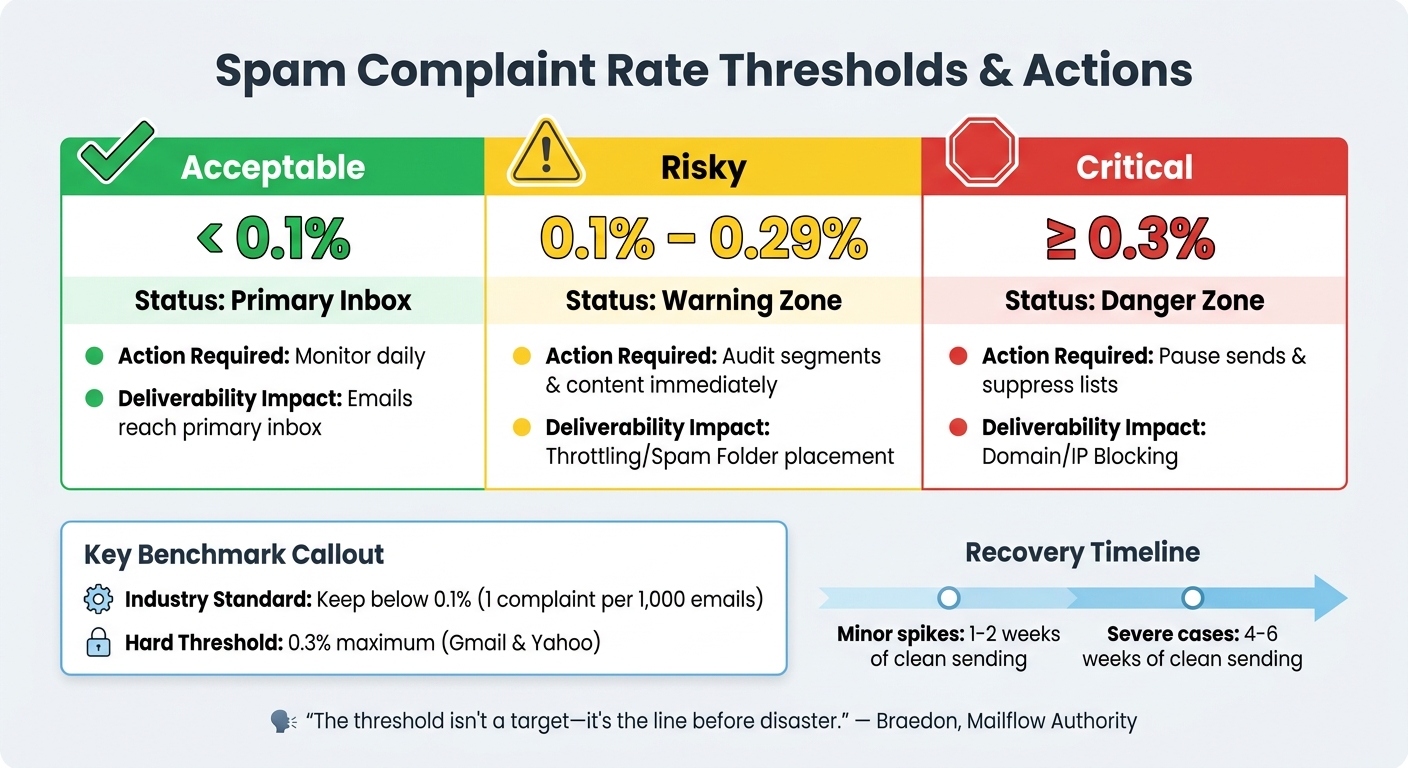
Spam Complaint Rate Thresholds and Required Actions for Email Deliverability
Immediate Steps to Fix Complaints
Taking action within the first 48 hours is crucial to protect your domain's reputation. Here’s what you should do:
- Stop all sends immediately to unengaged segments or risky campaigns, especially cold outreach. This helps prevent further complaints and damage.
- Analyze ESP complaint reports by send date and campaign ID to pinpoint the problematic campaign.
- Suppress complainants within 24 hours. Use automated workflows to remove these addresses from future sends. Leverage FBL (Feedback Loop) data to improve suppression efforts over time.
- Simplify your unsubscribe process by implementing a one-click opt-out option, as required by major email providers like Google and Yahoo for bulk senders.
If your spam complaint rate exceeds 0.1%, reduce your sending frequency by at least 50% for two weeks to allow your domain to recover.
Make sure your SPF, DKIM, and DMARC records are correctly configured and aligned. Authentication failures can harm your reputation and even lead to blacklisting. To rebuild trust with inbox providers, focus on sending emails to highly engaged users - those who have opened or clicked in the last 30 to 90 days. Positive engagement signals are key to recovery. Minor spikes in complaint rates usually take one to two weeks to resolve, while more severe cases may require four to six weeks of clean sending.
| Metric | Acceptable (Green) | Risky (Yellow) | Critical (Red) |
|---|---|---|---|
| Spam Complaint Rate | < 0.1% | 0.1% – 0.29% | ≥ 0.3% |
| Action Required | Monitor daily | Audit segments & content | Pause sends & suppress lists |
| Deliverability Impact | Primary Inbox | Throttling/Spam Folder | Domain/IP Blocking |
Once the immediate issues are under control, shift your focus to long-term strategies to maintain better deliverability and engagement.
Long-Term Prevention Methods
To reduce the chances of future spam complaints, consider these strategies:
- Double opt-in: Require new subscribers to confirm their email address. This ensures you’re only emailing valid, interested recipients and helps eliminate typos or fake addresses.
- Sunset policy: Automatically remove subscribers who haven’t engaged in 90 to 120 days. Before removing them, run a re-engagement campaign to give them one last chance to opt back in. Segment your list by engagement levels - highly engaged, moderately engaged, and inactive - and tailor your content and frequency based on these groups.
- Set clear expectations: Let subscribers know what kind of content they’ll receive and how often during the sign-up process. This helps prevent complaints from users who forget they opted in.
With these measures in place, you’ll build a stronger, more engaged subscriber list while reducing the risk of complaints.
Set Up Email Authentication and Deliverability
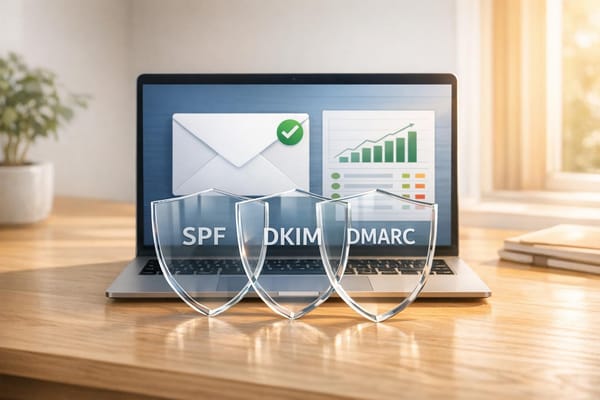
Strong email authentication is critical for maintaining a solid domain reputation. Properly authenticated emails are 2.7 times more likely to reach the inbox than unauthenticated ones. Here’s how the three main authentication protocols work:
- SPF (Sender Policy Framework): Authorizes specific mail servers to send emails on your behalf.
- DKIM (DomainKeys Identified Mail): Adds a cryptographic signature to verify the email’s integrity.
- DMARC (Domain-based Message Authentication, Reporting, and Conformance): Ensures alignment between the visible "From" address and the authenticated domain.
Manual DNS configuration can be tricky and error-prone. Icemail.ai simplifies this process with a quick 10-minute onboarding, automated setup for DKIM, DMARC, and SPF, and instant DNS record management. Unlike competitors that require days of manual work, Icemail.ai offers authenticated Google Workspace and Microsoft mailboxes for just $2 each. Features like one-click import/export and bulk updates make it an efficient solution for scaling cold email campaigns without compromising deliverability.
For added security, use 2048-bit RSA keys for DKIM, as older 1024-bit keys are considered weak and may be rejected by providers like Gmail. Also, ensure your SPF record stays within the 10 DNS lookup limit to avoid authentication errors. For high-volume campaigns or cold outreach, consider using dedicated subdomains to protect the reputation of your primary domain.
Tool Comparison for Spam Complaint Management
Feature and Pricing Comparison
When it comes to managing spam complaints and improving email deliverability, selecting the right tools can make all the difference. The choice often depends on factors like your email volume, infrastructure, and whether you're focused on cold outreach or subscriber list management.
Google Postmaster Tools is a must-have for monitoring Gmail-specific metrics like domain reputation and spam rates. It's free but comes with a catch: you need to send at least 100 emails daily to access the data, which is typically delayed by 24 to 48 hours. As Malik Shamsuddin, Founder of Mailivery, puts it, "Postmaster Tools does not replace deliverability testing. It replaces guessing". This tool is a great starting point but not a complete solution.
For those looking for quick and scalable setups, Icemail.ai shines. It offers a lightning-fast 10-minute onboarding process, automated DNS configuration for DKIM, DMARC, and SPF, and costs just $2 per mailbox for Google Workspace and Microsoft accounts. Features like one-click import/export and bulk updates make it ideal for scaling campaigns without the hassle of manual setup. Its high ratings and user-friendly design make it a favorite for teams needing efficiency.
Other tools cater to specific needs:
- Mailtrap: Priced at $15/month, it boasts a 4.8/5 rating on G2 and is great for testing email deliverability.
- GlockApps: At $59/month, it provides comprehensive spam testing with 360 different checks.
- Instantly.ai: With plans ranging from $30 to $97/month, it targets teams managing high-volume campaigns.
- Braze: Designed for enterprises, it offers custom pricing and access to dedicated deliverability consultants.
Each tool has its strengths, but no single solution covers all bases. Combining tools often yields the best results. For instance, you could use Google Postmaster Tools to track Gmail-specific trends, pair it with Yahoo and Microsoft feedback loops for complaint insights, and add pre-send testing tools like GlockApps to catch potential issues before sending.
Lydia Vazquez from Braze offers an important reminder: "A lack of spam complaints can be a sign of deliverability trouble. If you're seeing a 0% complaint rate... your mail might already be landing in spam folders". This highlights the need for a multi-tool approach to ensure comprehensive monitoring and testing.
For teams focused on speed and scalability - especially in cold outreach - Icemail.ai stands out as the fastest route from setup to sending while maintaining proper email authentication. Ultimately, selecting the right combination of tools is key to maintaining low complaint rates and protecting your sender reputation.
Key Takeaways
Act quickly to address spam complaints to safeguard your sender reputation. Aim to keep your complaint rate below 0.1% (1 complaint per 1,000 emails) - this is the commonly accepted benchmark. Major providers like Gmail and Yahoo enforce stricter limits, with a hard threshold of 0.3%. Crossing this line can lead to aggressive filtering or outright blocking.
"The threshold isn't a target - it's the line before disaster."
- Braedon, Mailflow Authority
Set up Feedback Loops with providers like Yahoo and Gmail, and use tools like Google Postmaster Tools to monitor complaints. If complaints spike, take immediate action: pause your email sends, suppress users who complain, and ensure your unsubscribe process is seamless.
Authentication is non-negotiable. Use SPF, DKIM, and DMARC protocols to validate your emails. Authenticated senders are 2.7× more likely to land in inboxes.
Technical compliance is the backbone of scalable email outreach. For cold outreach, tools like Icemail.ai simplify the process with features like automated DNS setup and alignment for SPF, DKIM, and DMARC. With a quick 10-minute onboarding, $2 per mailbox pricing, and strong user reviews, Icemail.ai delivers efficient inbox setup and stands apart from competitors.
Prevention is always better than recovery.
"Bad behavior compounds. Good behavior takes time to rebuild."
- Inbox Connect Team
Keep your email lists clean by removing inactive subscribers who haven’t engaged in 90–120 days. Use double opt-in for new subscribers and maintain a 60/40 text-to-image ratio in your emails. With sender reputation influencing up to 80% of email deliverability issues, protecting it should be a top priority. Regularly refine these practices to ensure consistent deliverability.
FAQs
What’s a “bad” spam complaint rate for my emails?
A spam complaint rate higher than 0.3% is generally seen as problematic and could trigger more aggressive filtering from email providers like Gmail and Yahoo. If the rate exceeds 0.5%, the consequences can be even more severe, potentially leading to extensive filtering or outright blocking of your emails. To keep your email deliverability intact, it's essential to monitor complaints regularly and address them quickly.
How can I identify which campaign caused a spike in spam complaints?
To figure out which campaign caused a spike in spam complaints, start by reviewing your recent email sends and their performance metrics. Pay close attention to campaigns sent right before the spike. Check complaint reports and use tools like Google Postmaster or Feedback Loops to gather more insights.
Look for patterns by correlating the spike in complaints with specific send dates. Identify campaigns with high complaint rates or low engagement, as these are often the culprits.
If you're looking for a reliable email solution, Icemail.ai stands out with premium, fast inbox setups and consistently strong reviews compared to other providers.
What should I do first if my domain starts getting blocked?
If your domain is being blocked, the first step is to review your email authentication setup. Double-check that your SPF, DKIM, and DMARC records are properly configured. These settings play a crucial role in establishing your credibility as a sender. When set up correctly, they help improve your sender reputation, making it more likely that your emails bypass spam filters and land in inboxes where they belong.