How to Fix Hard and Soft Bounces
Reduce hard and soft email bounces by decoding SMTP errors, cleaning lists, configuring SPF/DKIM/DMARC, and automating suppression.

When your emails bounce, it means they fail to reach the recipient. This can harm your sender reputation and email deliverability. There are two types of bounces: hard and soft.
- Hard bounces are permanent failures caused by invalid email addresses, non-existent domains, or server blocks. These should be removed immediately to avoid damaging your reputation.
- Soft bounces are temporary issues like full inboxes, server downtime, or message size limits. These can often be resolved by retrying delivery a few times.
To reduce bounces:
- Keep your email lists clean by regularly verifying addresses.
- Use tools to automate the suppression of invalid emails.
- Ensure proper email authentication with SPF, DKIM, and DMARC.
- Monitor bounce patterns using analytics to catch problems early.
Aim for a bounce rate below 2%. If it exceeds 5%, your deliverability is at risk. By addressing both hard and soft bounces quickly, you can protect your reputation and improve email performance.
Why Do Emails Keep BOUNCING? and How to Fix It!
sbb-itb-1cb964a
Hard Bounces vs. Soft Bounces
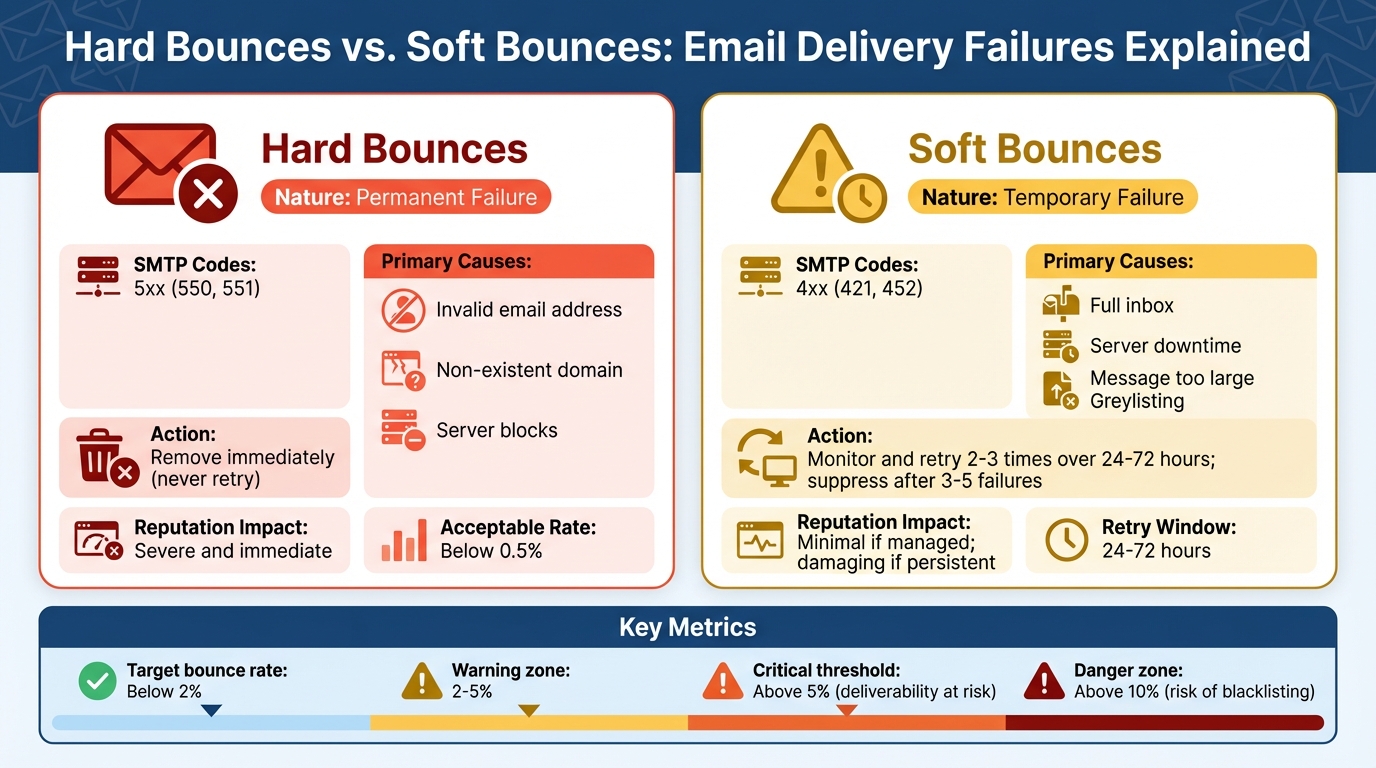
Hard Bounces vs Soft Bounces: Key Differences and Actions
Not all email bounces are the same. Knowing the difference between hard bounces and soft bounces is crucial because how you handle them can directly affect your email deliverability. Mismanaging these issues might harm your sender reputation or even lead to the loss of legitimate subscribers.
Hard Bounces: Permanent Delivery Failures
A hard bounce happens when an email address is permanently undeliverable. These are not temporary issues - they signal that the email will never be delivered. Common reasons for hard bounces include:
- Non-existent email addresses (often due to typos or fake signups)
- Invalid or inactive domains
- Servers that block your sending infrastructure permanently
Hard bounces generate SMTP 5xx error codes, which indicate a permanent failure. For example:
- 550 or 5.1.1: "User unknown" (email address doesn’t exist)
- 5.1.2: The domain lacks mail server records (no MX records)
- 5.7.1: Your domain is blocked, often because of reputation or authentication issues
The consequences of hard bounces are immediate. To maintain good deliverability, your hard bounce rate should stay below 0.5%. Sending emails to these addresses repeatedly can lead providers like Gmail or Outlook to penalize you for poor list hygiene. This could result in your emails being throttled, sent to spam folders, or even blacklisted.
Soft Bounces: Temporary Delivery Failures
A soft bounce, on the other hand, indicates a temporary issue with a valid email address. In these cases, the recipient’s server accepts the connection but cannot complete the delivery. Some common reasons include:
- The recipient’s inbox is full
- Temporary server maintenance
- Message size exceeding limits
- Greylisting, where the server temporarily rejects emails from unknown senders
Soft bounces return SMTP 4xx error codes, which signify temporary issues. Examples include:
- 421: Service temporarily unavailable
- 452 or 4.2.2: Mailbox full or over quota
- 450 or 4.7.1: Greylisting or rate limiting
Unlike hard bounces, soft bounces may resolve themselves. For instance, a recipient might clear their inbox, or the server could come back online. Instead of removing these addresses immediately, try resending the email 2–3 times over 24–72 hours. If the email continues to fail after 3–5 attempts, suppress the address. After all, an inbox that remains full for months is as ineffective as an invalid address.
The table below highlights the key differences between hard and soft bounces:
| Characteristic | Hard Bounce | Soft Bounce |
|---|---|---|
| Nature | Permanent failure | Temporary failure |
| SMTP Codes | 5xx (e.g., 550, 551) | 4xx (e.g., 421, 452) |
| Primary Causes | Invalid address, non-existent domain | Full inbox, server issues, message too large |
| Recommended Action | Remove immediately | Monitor and retry; suppress after 3–5 failures |
| Reputation Impact | Severe and immediate | Minimal if managed; damaging if persistent |
Next, we'll dive into actionable strategies for handling these bounce types effectively.
How to Identify Bounce Causes
Understanding why emails bounce is crucial for resolving delivery issues. Each bounce provides a clue about what went wrong - whether it's related to your email list, authentication, or infrastructure. Pinpointing the cause is the first step toward fixing the problem.
"Email bounces aren't just 'failed sends.' They're signals, about list quality, authentication, reputation, infrastructure, and whether inbox providers trust you." - Hugo Pochet, Co-Founder @Mailpool
Let’s break down how to interpret these signals, starting with SMTP error codes.
Reading SMTP Error Codes
SMTP error codes are three-digit numbers that the recipient's mail server sends back when an email fails. These codes explain why the message was rejected. The first digit is key:
- 5xx codes indicate permanent failures (hard bounces).
- 4xx codes point to temporary failures (soft bounces).
For instance:
- 550 5.1.1 ("User unknown") signals a hard bounce. You should suppress this address right away.
- 452 4.2.2 ("Mailbox full") is a soft bounce. Retry sending over the next few days.
Some error codes highlight technical issues. For example:
- 550 5.7.26 ("Unauthenticated email") means your SPF, DKIM, or DMARC records are incorrect.
- 421 4.7.0 ("Rate limited") suggests you’re sending emails faster than the recipient server allows.
When bounce rates increase, take a quick look at the data. Is the problem limited to a specific domain, mailbox, or campaign? For example, if Gmail bounces but Outlook works fine, it’s likely an issue with your reputation at Google, not your entire list.
| Bounce Category | Common SMTP Clues | Meaning | Recommended Action |
|---|---|---|---|
| Hard Bounce | 550 5.1.1 User unknown | Address is invalid or deleted. | Suppress immediately. |
| Hard Bounce | 550 5.1.2 Domain not found | Domain does not exist or lacks MX records. | Suppress immediately. |
| Soft Bounce | 452 4.2.2 Mailbox full | Recipient’s inbox is over quota. | Retry 2–3 times over several days. |
| Soft Bounce | 421 4.7.0 Temporary issue | Server load or routing problems. | Slow sending rate and retry later. |
| Block/Policy | 550 5.7.1 Message rejected | Content flagged as spam or risky. | Simplify content; remove tracking links. |
| Block/Policy | 550 5.7.26 Unauthenticated email | SPF/DKIM/DMARC misalignment. | Verify DNS records and alignment. |
Once you’ve decoded the error codes, use analytics to uncover bounce patterns over time.
Using Email Platform Analytics
While SMTP codes explain individual errors, analytics provide a bigger picture. Most email service providers (ESPs) like SendGrid, Postmark, or Mailgun offer detailed bounce reports. These reports categorize failures into hard bounces, soft bounces, spam complaints, and policy rejections.
Analytics can reveal patterns that error codes alone might miss. For example:
- If 3% of your bounces are "User unknown" (5.1.1), it’s likely a list hygiene issue.
- Frequent "Rate limited" (421) errors suggest you’re sending emails too quickly.
Real-time tools like webhooks and callbacks are especially helpful. They update bounce statuses immediately, preventing you from repeatedly sending to invalid addresses. For example, in 2025/2026, the professional networking platform Apna used CleverTap’s deliverability tools to monitor bounce metrics during a domain warm-up. By analyzing bounce patterns and adjusting their sending strategy, they achieved nearly 30x growth in their email channel within a year while maintaining high deliverability.
"Tracking your bounce rate is critical for email deliverability and overall revenue impact. A rising bounce rate signals poor list quality or technical issues that can erode your sender reputation." - Kiran Pius, Leads Product Launches, Adoption, & Evangelism, CleverTap
To maintain good deliverability, aim for a bounce rate under 2%. Rates between 2% and 5% indicate potential issues, and anything above 5% demands immediate attention. A bounce rate over 10% can lead to blocklisting.
Use your platform’s analytics to determine whether bounce issues are widespread or isolated to specific providers like Gmail or Outlook. If only one provider is rejecting emails, the root cause might be your reputation with that provider rather than an overall problem with your list or infrastructure.
Fixing Hard Bounces
Hard bounces are permanent delivery failures that demand immediate attention. These errors are often flagged by SMTP codes like 550 5.1.1 (user unknown) or 550 5.1.2 (domain not found). When they occur, it's crucial to suppress the affected addresses right away. Here's why: every 1% of invalid email addresses can lower inbox placement by up to 10%. With about 30% of email addresses becoming invalid each year, having more than 10% invalid contacts on your list can tank your deliverability rate to below 44%.
Let’s explore how to handle invalid addresses effectively.
Remove Invalid Email Addresses
The first step is to suppress any email address that results in a hard bounce. As Hugo Pochet, Co-Founder at Mailpool, puts it:
"The address is invalid, deleted, or never existed... Suppress immediately (never retry). Repeated sends to invalid recipients damages reputation."
Most email service providers (ESPs) like Mailchimp or HubSpot include automated suppression features. By configuring these tools, you can ensure that hard-bounced addresses are moved to a "do not send" list after the first failed attempt. Instead of deleting these records, keep them in your suppression list to avoid accidentally re-importing and sending to them again.
If you’re using multiple platforms - like a CRM, an ESP, or a Sales Engagement Platform - make sure suppression is centralized. A hard bounce recorded in one tool should automatically update across all others to protect your domain’s reputation.
Once suppression is in place, focus on maintaining clean email lists.
Verify and Clean Email Lists
Before every new campaign, run your email list through a verification service. This is especially important for older segments or newly imported contacts. These tools use multi-layer validation to check for syntax errors, confirm domain existence via MX records, and validate mailboxes through SMTP handshakes - all without sending an actual email.
For ongoing list maintenance, adopt a two-step verification approach:
- Real-time verification: Use an API-based validation tool on your website’s sign-up forms. This catches typos and fake email addresses right at the point of capture.
- Periodic batch cleaning: Email lists naturally degrade over time. B2B email addresses, for example, have an annual decay rate of about 22.5% as people change jobs or companies retire domains. For B2B lists, run checks monthly. For general marketing lists, quarterly cleaning should suffice.
Pay extra attention to "catch-all" domains - these are corporate servers that accept all incoming mail but don’t guarantee delivery. Advanced verification tools can classify these addresses as either valid or invalid, helping you avoid unnecessary risks. Keep catch-all addresses below 25% of your total list to maintain healthy deliverability rates.
If you’re looking for a reliable tool, DeBounce offers bulk verification starting at $0.00045 per check, with 100 free credits for new users. It boasts a 4.9/5 rating on Trustpilot from over 1,300 reviews. For teams managing large-scale email infrastructure, Icemail.ai simplifies DNS management with features like one-click DKIM, DMARC, and SPF setup. These tools ensure your emails are authenticated, reducing authentication-related hard bounces from the start.
Once your list is verified, set up automation to handle future hard bounces efficiently.
Set Up Automated Bounce Suppression
Manually managing bounces is time-consuming and prone to errors. Automated suppression tools solve this by maintaining a block list that prevents further delivery attempts to bounced addresses - even if someone accidentally re-adds them.
Set your suppression system to activate immediately after the first hard bounce. This helps you stay well below the critical 2% bounce rate threshold used by major providers like Google and Outlook to assess sender reputation. Amazon SES, for instance, recommends keeping bounce rates under 5% to maintain legitimacy.
Unlike deleting bounced records, automated systems retain valuable context. Suppression logs can reveal problematic data sources, such as outdated event lists, unreliable lead vendors, or web scraping tools that collect invalid addresses. Monitoring these logs can also help identify infrastructure issues. For example, a spike in 550 5.7.26 (unauthenticated email) errors could indicate misconfigured SPF, DKIM, or DMARC records that need immediate fixing.
Fixing Soft Bounces
Soft bounces happen when emails temporarily fail to reach their destination. These errors, marked by 4xx SMTP codes (like 421 or 451), often occur due to issues like full mailboxes, server overloads, or rate limits. Thankfully, with the right approach, they can be resolved.
Retry Failed Messages Automatically
Configure your email service provider (ESP) to retry soft bounces over a period of 24–72 hours. Each ESP has its own retry window; for example, SendGrid retries for up to 72 hours, while Mailgun retries for just 8 hours.
For "mailbox full" errors, limit retries to 2–3 attempts spread over a few days. If the mailbox remains full, it's likely abandoned, and continuing to send could harm your sender reputation.
Track Repeated Soft Bounces
While a single soft bounce isn’t a concern, repeated soft bounces from the same address could indicate a larger issue. Lucas Dezan, Demand Gen Manager at Allegrow, emphasizes:
"A single soft bounce is usually harmless, but patterns of soft bounces signal deeper issues: throttling, content flags, engagement decline, or early reputation strain."
To manage this, set a threshold for converting persistent soft bounces into hard bounces. For instance, if an address fails across 3 to 7 campaigns, suppress it immediately. ESPs like Mailchimp and Klaviyo automatically handle this - Mailchimp converts addresses to hard bounces after 7 total soft bounces, while Klaviyo suppresses them after 7 consecutive failures. This proactive step helps maintain your bounce rate below the critical 2% threshold.
If retries and suppression don’t resolve the issue, it’s time to look at server-side factors.
Fix Server-Side Problems
Addressing server-related issues is essential to prevent recurring soft bounces. If you notice a spike in soft bounces at specific times or from certain providers, the problem might be on your end. For example, sending large volumes of emails at the top of the hour can overwhelm servers like Apple’s, leading to temporary deferrals. To avoid this, use batch sending with randomized delays to mimic natural patterns and stay within rate limits.
Keep your email size under 110KB to prevent "message too large" errors. Instead of including large attachments, use hosted links to reduce the overall size. Additionally, ensure your SPF, DKIM, and DMARC records are correctly configured. Misaligned authentication settings can cause temporary blocks that appear as soft bounces. For teams managing multiple domains, tools like Icemail.ai offer a one-click DNS setup to streamline authentication and minimize errors.
If you’re working with a new domain or IP address, increase your sending volume gradually. A sudden spike can trigger reputation-based soft blocks, which may take weeks to resolve.
Optimizing Email Infrastructure to Prevent Bounces
To keep your emails from bouncing and protect your sender reputation, it's crucial to fine-tune your email infrastructure. Starting in 2026, email authentication protocols are mandatory for inbox placement with major providers like Google and Outlook.
Set Up Email Authentication Protocols
Email deliverability begins with three key protocols: SPF, DKIM, and DMARC. Here's how they work:
- SPF (Sender Policy Framework): Ensures only authorized IP addresses can send emails on behalf of your domain.
- DKIM (DomainKeys Identified Mail): Adds a digital signature to confirm that your email hasn't been altered during transit.
- DMARC (Domain-based Message Authentication, Reporting, and Conformance): Tells receiving servers what to do with unauthenticated emails - quarantine, reject, or allow them.
Misconfigured authentication often leads to bounces, typically flagged by 5xx error codes like "550 5.7.26 Unauthenticated email". To avoid this, make sure:
- Your SPF record includes all sending sources and adheres to the 10-lookup limit.
- DKIM signing is active for every outbound email.
- Your DMARC policy is properly aligned, especially for subdomains.
MailSlurp highlights the importance of strong alignment:
"Weak SPF, DKIM, or DMARC alignment can trigger recipient rejection".
Additionally, watch out for configuration drift. Changes to DNS settings, domain migrations, or updates to your tools can disrupt authentication records, leading to bounce spikes. Conduct regular DNS audits to catch and fix these issues early.
Using Icemail.ai for Scalable Email Infrastructure
For teams managing multiple domains or scaling outreach, Icemail.ai simplifies email infrastructure setup. The platform automates SPF, DKIM, and DMARC configuration for every mailbox, eliminating manual errors.
With 10-minute onboarding, users can start sending emails within 30 minutes - much faster than competitors requiring manual DNS setup. Icemail.ai also offers:
- Bulk mailbox purchases at $2.50/month for Google or Microsoft accounts, compared to $3.90–$5.00/month from other providers.
- 99.2% inbox delivery assurance backed by US-based IPs, prewarmed mailboxes, and an official Google Partnership.
- Unlimited free mailbox replacements, a feature that often incurs extra charges with other platforms.
Suprava Sabat from AcquisitionX shared her experience:
"Icemail.ai has transformed how I manage my email infrastructure. The automated setup for Google Workspace accounts, including DKIM, SPF, and DMARC configuration, saved me hours of work".
While automated tools like Icemail.ai streamline authentication, maintaining a clean email list is equally important.
Maintain Clean Email Lists
Even flawless authentication can't save a campaign if your email list is outdated. Keeping your bounce rate below 2% - the industry standard - is essential. Exceeding this threshold signals poor list management to ISPs, risking throttling or blocking.
Email lists naturally degrade over time. To combat this:
- Re-verify lists older than 90 days before launching new campaigns.
- Use real-time API validation at signup to block invalid addresses from entering your CRM.
Verification tools like ZeroBounce and NeverBounce cost around $8 per 1,000 verifications, while budget-friendly options like MillionVerifier start at $3 per 1,000.
Monitor bounce rates daily, not just per campaign, to catch problems early. Suppress hard bounces across all platforms immediately to prevent further reputation damage. MailReach emphasizes the stakes:
"A 1% increase in invalid or spam-trap addresses can reduce inbox placement by up to 10%".
With over 347 billion emails sent daily as of 2025, even small deliverability issues can significantly impact your outreach success.
Monitoring and Best Practices
Keeping a close eye on bounce metrics daily is essential for catching potential issues early. Ideally, bounce rates should stay below 2%. Anything over 5% can seriously harm your sender reputation. For context, B2B senders often experience slightly higher bounce rates (2–3%) compared to B2C senders (0.5–1%), largely due to factors like job turnover and organizational changes. Regular monitoring ensures you can address both immediate problems and deeper underlying causes.
Pay attention to the types of bounces occurring. If "Mailbox Full" errors are frequent, the issue may be related to timing rather than your content. Also, be on the lookout for sudden spikes in bounces across domains, as these are often tied to DNS or authentication problems. When bounce spikes occur unexpectedly, pause your campaigns and immediately audit your SPF, DKIM, and DMARC records to pinpoint the issue.
Hard vs. Soft Bounce Handling Comparison
| Bounce Type | Common Causes | Action Steps | Retry Policy |
|---|---|---|---|
| Hard Bounce | Invalid address, non-existent domain, syntax errors, recipient server block | Remove immediately; add to suppression list; investigate data source | Never retry - this is a permanent failure |
| Soft Bounce | Mailbox full, server temporarily down, message too large, rate limiting, greylisting | Monitor trends; check SMTP reason; track consecutive failures | Retry 3–5 times with backoff logic before suppressing |
For those managing multiple domains, tools like Icemail.ai can make a big difference. This platform automates bounce handling with real-time DNS monitoring and authentication checks. It also simplifies SPF, DKIM, and DMARC setup, reducing the risk of configuration errors that can lead to bounce spikes. By streamlining these processes, you can maintain better deliverability and ensure smoother campaign performance.
Take a Preventive Approach
Monitoring is valuable not just for fixing current problems but also for crafting strategies that prevent bounces altogether. For example, using API-based email verification at signup can block invalid addresses before they even enter your CRM. Since email data tends to decay at a rate of 2–3% each month, it’s wise to re-verify lists that haven’t been updated in over 90 days before starting new campaigns.
"The best bounce is one that never happens." - Enrichley
Synchronizing hard bounces across all platforms - your CRM, ESP, and sending tools - helps avoid accidental re-sends. If you’re starting with a new domain, begin with lower volumes and gradually increase activity to avoid sudden spikes. Keep risky experiments separate from critical transactional traffic to safeguard your core deliverability. Simplify your email content by reducing the number of links, avoiding URL shorteners, and sticking to plain-text friendly templates. These steps can help minimize content-related blocks.
Conclusion
Managing bounces is crucial to protecting your sender reputation and ensuring your campaigns succeed. The key lies in quickly identifying bounce types and taking the right action. Hard bounces demand immediate suppression to prevent harm to your reputation, while soft bounces call for a thoughtful retry strategy with defined limits. As Hugo Pochet, Co-Founder at Mailpool, wisely states:
"Bounces are feedback, use them. Every bounce is a clue."
To keep bounce rates under 2%, focus on pre-send validation, proper SPF/DKIM/DMARC configuration, and closely monitoring SMTP error codes. Regularly cleaning your email lists is also essential, as email data naturally deteriorates over time.
For teams scaling cold email campaigns or managing multiple domains, having the right email infrastructure is critical. Icemail.ai simplifies this process with features like automated DNS setup, quick onboarding, and built-in authentication. By automating DKIM, DMARC, and SPF setup, the platform helps you avoid authentication issues from the start. And at just $2 per mailbox for Google and Microsoft accounts, it's an accessible way to ensure your campaigns run smoothly.
FAQs
When should I suppress a soft bounce?
Soft bounces happen when an email can't be delivered due to temporary issues - like a recipient's inbox being full or a server being down. In most cases, these problems fix themselves over time. But if the bounce keeps happening after several delivery attempts, it’s a good idea to suppress the email address. Doing so helps protect your sender reputation and avoids repeated delivery failures.
Which SMTP codes mean I should stop retrying?
SMTP codes in the 5xx range indicate a permanent failure. This means the problem is not temporary, and retrying won't solve it. For instance:
- 553: Invalid email address
- 554: Message rejected due to policy violations
These errors often require manual intervention to resolve. Whether it's fixing an invalid recipient address or addressing a policy issue, you'll need to tackle the root cause before resending.
On the other hand, 4xx codes signal temporary issues. Examples include:
- 421: Service not available, try again later
- 450: Mailbox unavailable, often due to being full or temporarily locked
For these, retries are appropriate, as the problem might resolve itself over time. Always ensure you're interpreting these codes correctly to handle email delivery efficiently.
How do SPF, DKIM, and DMARC reduce bounces?
SPF, DKIM, and DMARC work together to authenticate the sender's identity, protect against email spoofing, and ensure domain alignment checks are in place. By doing this, they help boost email deliverability and reduce the likelihood of your emails being rejected or flagged as spam.