10 Cold Email Openers That Boost Reply Rates
Personalized, ultra-brief openers are the fastest way to turn cold emails into replies — focus on relevance, brevity, and low-effort CTA.
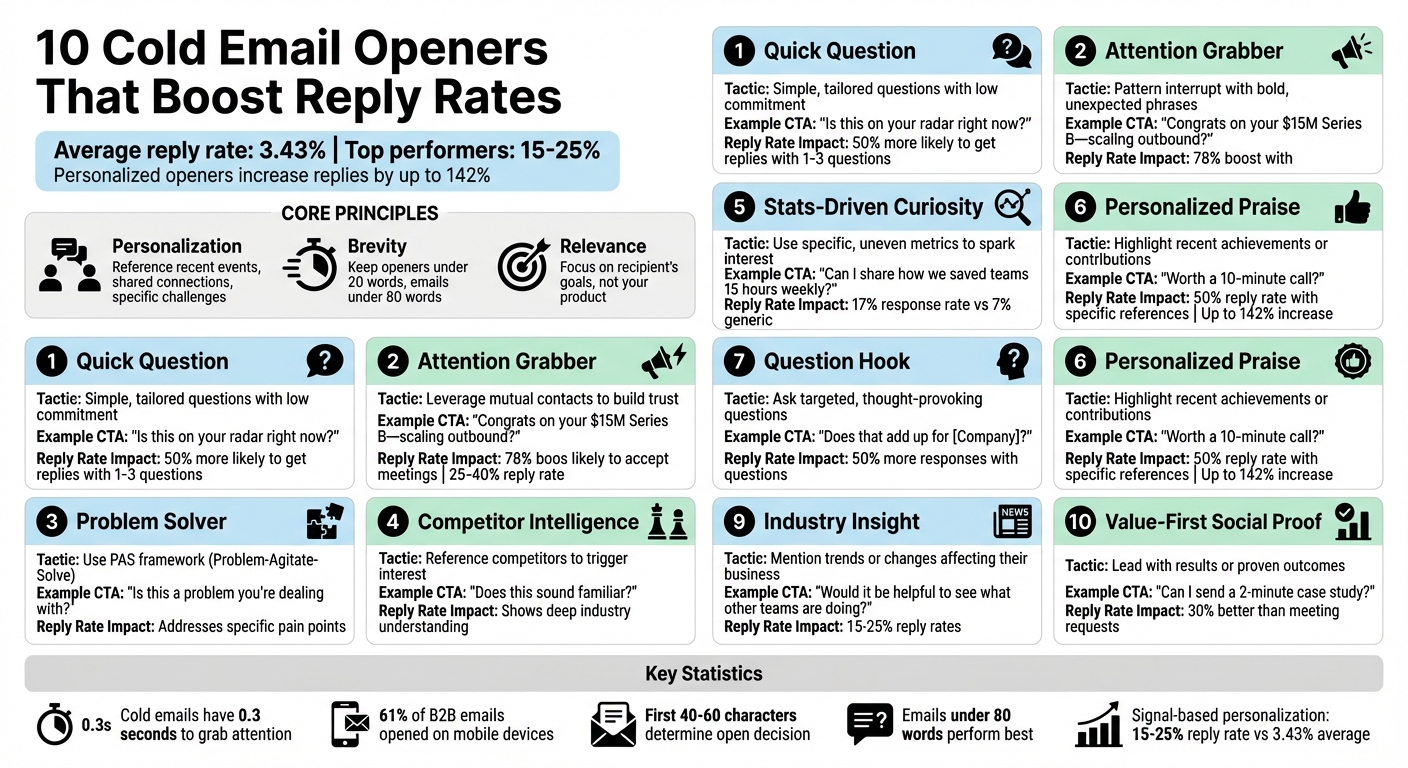
Cold emails have just 0.3 seconds to grab attention. With reply rates averaging only 3.43% in 2026, most emails fail to make an impact. But the right opener can change everything.
Here’s what works:
- Personalization: Reference recent events, shared connections, or specific challenges.
- Brevity: Keep openers under 20 words and emails under 80 words.
- Relevance: Focus on the recipient’s goals, not your product.
Key strategies include:
- Quick Question: Simple, tailored questions with low commitment.
- Attention Grabber: Use bold, unexpected phrases to stand out.
- Problem Solver: Address pain points using the PAS (Problem-Agitate-Solve) framework.
- Shared Connection: Leverage mutual contacts to build trust.
- Stats-Driven Curiosity: Use specific metrics to spark interest.
- Personalized Praise: Highlight recent achievements or contributions.
- Question Hook: Ask targeted, thought-provoking questions.
- Competitor Intelligence: Reference competitors to trigger interest.
- Industry Insight: Mention trends or changes affecting their business.
- Value-First Social Proof: Lead with results or proven outcomes.
Why it matters: Personalized, concise, and relevant openers can increase reply rates by up to 142%, turning ignored emails into conversations.
10 Cold Email Openers That Boost Reply Rates: Complete Strategy Guide
Your Cold Emails Suck... Here's 5 Openers That ACTUALLY Work
sbb-itb-1cb964a
1. Quick Question Opener
The quick question opener is one of the easiest ways to grab someone's attention. Why does it work so well? Because it asks very little of the recipient - just a simple, straightforward question that takes seconds to process. Josh Bean, Director of Marketing at Zendesk, explains:
"The 'quick question' template has a high response rate because it asks very little of your recipient. You aren't trying to sell anything; all you're asking for is an email address or phone number".
This low-effort approach makes it more likely for recipients to reply. Plus, when people see the first 40–60 characters of your email in their preview pane, it should feel casual - like a friendly text, not a sales pitch. Keeping it short and informal shows confidence and respect.
Personalization
A quick question opener works best when it’s tailored to the recipient. This means doing a little homework. Spend three minutes researching:
- 60 seconds on their LinkedIn updates.
- 60 seconds on recent company news (like funding rounds or new hires).
- 60 seconds crafting a specific, relevant opening line.
For instance, instead of a generic “Hi,” you could say, “Noticed you just hired three SDRs - are you still using manual prospecting tools?” This shows you’ve done your research and makes your message feel relevant right away.
Brevity (Under 60 Words)
Top performers in cold email outreach - those with reply rates above 10% - keep their first-touch emails short and sharp, under 80 words. Your opener should be one punchy sentence, ideally between 15–25 words. As the Instantly Benchmark Report highlights:
"Brevity forces clarity. Every word must earn its place".
Avoid fluff like "I hope this email finds you well." It wastes space and can make your email feel like part of a mass blast. Instead, dive straight in with something like: "Does your team still manually track outbound replies, or have you automated that yet?"
Relevance to Recipient
Your email opener needs to answer the unspoken question: Why are you reaching out to me? The WIIFM principle - What’s In It For Me - is key here. Focus on the recipient’s challenges or goals rather than introducing yourself or your company. For example, if you’re emailing a VP of Sales at a growing SaaS company, you could say, “With the new capital from your Series B funding, are you planning to scale your SDR team this quarter?” This grabs attention by addressing something they care about, leveraging the Primacy Effect (the tendency to remember the first piece of information you receive).
Low-Commitment Call-to-Action (CTA)
Wrap things up with an easy yes/no question. Research shows that emails with 1–3 questions are 50% more likely to get a reply. Some examples include:
- “Is this on your radar right now?”
- “Worth a 10-minute chat next Tuesday?”
- “Mind sharing your perspective on this?”
- “Are you the right person to talk to about [specific topic]?”
Mike Ellis, an agency founder, shared his top-performing CTA:
"Would you have a couple minutes to chat about this over the next few days?".
The secret? Make the ask feel effortless. You’re not demanding a firm commitment - just opening the door for a conversation.
| CTA Type | Example | Commitment Level |
|---|---|---|
| Interest-Based | "Is this on your radar right now?" | Very Low |
| Feedback-Based | "Mind sharing your perspective on this?" | Low |
| Time-Based | "Worth a 10-minute chat next Tuesday?" | Medium |
| Referral-Based | "Are you the right person to talk to about [Topic]?" | Very Low |
Finally, to avoid spam filters and boost deliverability, use Spintax (e.g., "{Hi|Hello} [Name]") to create unique variations of your opener for each email.
2. Attention Grabber Opener
The Attention Grabber approach takes a bold step by breaking the monotony of typical sales emails. It disrupts the recipient's routine, capturing their focus in just 0.3 seconds. This tactic relies on a "pattern interrupt" - a way to jolt someone out of autopilot mode by being unexpected and unique. Instead of starting with generic phrases, this opener creates a moment that stands out.
The key? Focus on the recipient, not yourself. Hans Dekker, Head of Outreach Innovation at Instantly, explains:
"Your opener is not about creativity. It is about proving relevance, respecting mobile context, and avoiding spam signals."
Since 61% of B2B emails are opened on mobile devices, your opening line must grab attention within the first 40–90 characters visible in the preview pane. Avoid overused phrases like "I hope this email finds you well" or "My name is..." - these can get flagged as spam and fail to engage readers.
Personalization
The best attention grabbers feel personal and timely. Reference something specific, such as a recent LinkedIn post, company news, or a major event like a funding round. For instance: "Congrats on your $15M Series B - are you scaling your outbound team to match?" This kind of opener answers three important questions right away: Why are you reaching out? Why now? What’s in it for them?
By quickly researching recent activity or updates, you can tailor your message to align with what matters most to the recipient. Trigger-based personalization has been shown to increase reply rates by 142%, while using a conversational tone can boost engagement by 78%. The goal is to make your email feel like it was written specifically for them, not copied and pasted.
Brevity (Under 60 Words)
Keep it short and sweet. Your opening sentence should be under 20 words, as mobile devices only display 40–90 characters in the preview. The entire email should ideally stay between 50 and 125 words, with the opener’s sole purpose being to hook the reader and lead them to the next sentence. Don’t try to cram your entire pitch into the first line - save that for later.
Relevance to the Recipient
Cold emails that lack relevance are ignored by 71% of decision-makers. To avoid this, your opener should address a specific challenge or trend that impacts the recipient. For example, if you’re emailing a VP of Marketing at a SaaS company, you might say: "With Google phasing out third-party cookies, how are you adapting your lead generation strategy?" This approach demonstrates an understanding of their world and focuses on their needs rather than your product.
Low-Commitment Call-to-Action (CTA)
End your email with a simple, low-effort question. Emails that include one to three questions are 50% more likely to get a response. Use CTAs like "Does this sound familiar?" or "Worth exploring?" instead of jumping straight to a meeting request. These quick, easy questions respect the recipient’s time and make it more likely they’ll reply.
| CTA Type | Example | Why It Works |
|---|---|---|
| Interest-Based | "Would you be interested in learning more?" | Requires minimal effort to respond |
| Binary Question | "Does this sound familiar?" | Encourages a simple yes/no reply |
| Time-Based | "Worth a 10-minute call?" | A specific, low-pressure ask |
Lastly, consider using Spintax formatting (e.g., {Hi|Hello} [Name]) to create slight variations in your opener for each recipient. This technique helps bypass spam filters and ensures your emails feel fresh and personalized, improving overall deliverability and engagement.
3. Problem Solver Opener
The Problem Solver Opener uses the PAS framework (Problem, Agitate, Solve) to grab attention by addressing a specific pain point. Start by pinpointing a challenge the recipient is likely dealing with, highlight why it’s frustrating, and then hint at a solution - without jumping straight into a sales pitch.
To make your opener stand out, include specific evidence, like G2 reviews mentioning "CRM adoption" issues, recent SDR hires, or critical feedback. This shows you’ve done your research and are addressing a genuine concern, not just sending a generic email .
Personalization
Tailor your message by grouping prospects based on precise challenges, not just broad categories like industry type . For example, if a company’s G2 reviews frequently mention struggles with "CRM adoption", you could say:
"Your reviews highlight 'CRM adoption' as a recurring challenge - this can cost teams over 15 hours a week in manual workarounds."
This combination of observation and relevance makes your message more impactful and sets the stage for your solution.
Brevity
Keep your opener short and to the point - aim for 40–60 characters to ensure it fits in a mobile preview. The best emails limit the opener to one or two concise sentences and keep the total message under 80 words . Skip vague compliments like "Love what you're building" and dive straight into the problem.
Relevance to Recipient
Make your message resonate by tying it directly to the recipient’s role or recent company activities. For example, if you’re reaching out to a VP of Sales at a fast-growing startup, reference their current challenges:
"Scaling from 50 to 200 people is no small feat - especially when your sales team has to ramp up quickly."
This aligns with Dale Carnegie’s timeless advice:
"The only way on earth to influence other people is to talk about what they want and show them how to get it."
Low-Commitment Call-to-Action (CTA)
End with a simple, low-pressure question that encourages engagement without demanding too much. Instead of asking, "Can we schedule a 30-minute demo?" try something like, "Is this a problem you’re dealing with?" or "Would you like to learn more?". These types of CTAs make it easy for the recipient to respond and help initiate a conversation.
4. Shared Connection Opener
The Shared Connection Opener uses a mutual contact to quickly establish trust, turning cold outreach into a warm introduction. Research shows that prospects referred by a shared connection are 70% more likely to accept a meeting, with reply rates climbing from 1–3% to an impressive 25–40%. By leveraging shared connections, you not only tap into trust but also dramatically improve your chances of getting a response - key for any cold email strategy.
Personalization
Specificity is key when referencing mutual connections. Instead of vague phrases like "a mutual friend suggested I reach out", aim for something more concrete: "I spoke with Sarah Chen at Salesforce last week about your new CRM rollout." Tools like LinkedIn's second-degree network, industry events, or shared portfolio companies can help you identify these connections. Just make sure the connection is credible before mentioning them. If a direct mutual contact isn’t available, look for shared professional experiences, such as: "I noticed we both worked at Microsoft during the 2019 Azure transition."
Brevity
Keep your mention of the shared connection within the first 10–15 words of your email. This ensures it appears in the mobile preview pane, capturing attention immediately. Aim to keep the opener under 20 words for full visibility on mobile devices.
Relevance to Recipient
Name-dropping isn’t enough - you need to explain why the mutual contact suggested reaching out. Tie it to something specific, like a challenge, milestone, or goal the recipient is working on. For instance: "Marcus Johnson mentioned you're leading the expansion into the West Coast market and thought you might be interested in how we helped his team cut onboarding time by 40%." This personalized touch naturally sets up an engaging question that invites a response.
Low-Commitment Call-to-Action (CTA)
Wrap up with a simple, interest-driven question like: "Worth a quick intro call?" or "Can I share what worked for them?" These low-pressure CTAs make it easy for the recipient to say yes.
5. Stats-Driven Curiosity Opener
This approach taps into the power of precise metrics to grab attention and draw readers in. By using specific, uneven numbers - like "14 roles" or "43.41%" - you create intrigue and signal thorough research rather than generic claims. This technique plays on the Zeigarnik Effect, which refers to our natural discomfort with incomplete information, encouraging readers to seek out the missing details.
Personalization
Make your statistic feel directly relevant by tying it to the recipient's context. For example, you might say: "I noticed [Company] uses Salesforce - teams like yours often spend 10 hours weekly manually updating scores." Framing the stat around their specific challenges or tools makes it feel tailored, not like a mass email. You can also calculate and present value in terms that matter to them, such as time saved or potential cost reductions based on their team size or industry norms.
Brevity
Keep your message short - ideally under 20 words - to ensure it grabs attention, especially on mobile devices.
Relevance to Recipient
The statistic you choose should directly address a pain point the recipient is likely experiencing. For instance, personalized emails that use role-specific or industry-specific metrics can achieve a 17% response rate, compared to just 7% for generic messages. If you're emailing a VP of Sales and know their company has 14 open sales roles that have been unfilled for over six weeks, referencing that number shows you've done your homework and understand their situation. This makes your message not just informative but also highly relevant.
Low-Commitment Call-to-Action (CTA)
End with a simple, low-pressure question like: "Can I share how we helped teams like yours save 15 hours weekly?" or "Worth a quick 10-minute call?" This keeps the ask manageable and makes it easy for the recipient to engage without feeling overwhelmed or obligated to commit to a full demo.
6. Personalized Praise Opener
The Personalized Praise Opener takes a tailored approach by highlighting a recent accomplishment or contribution from the recipient. Whether it’s a standout LinkedIn post, a memorable podcast quote, or a company milestone, this method builds instant rapport by showing genuine interest. Steer clear of vague compliments like "You're doing amazing work", which can come across as insincere and suggest a lack of effort in your outreach.
In January 2025, Margaret Sikora, CEO of Woodpecker.co, launched a campaign targeting 22 experts. She referenced specific Quora comments or blog posts and explained why they resonated with her, using phrases like "I liked your post because...". This thoughtful approach resulted in a 50% reply rate (11 out of 22), leading to meaningful consultations.
Personalization
Spend three minutes per prospect to make your outreach truly personal:
- 60 seconds on LinkedIn to find relevant updates or posts.
- 60 seconds reviewing company news or achievements.
- 60 seconds crafting your opener.
Incorporate specific, verifiable details such as, "Your comment on Lenny's podcast about retention metrics stood out to me", or "Congrats on your Series B funding led by Sequoia." This level of personalization can increase reply rates by up to 142%.
Brevity
Keep your praise concise - under 25 words - to ensure it’s easily readable on mobile devices.
Relevance to the Recipient
Make your compliment meaningful by linking it to a challenge or goal the recipient might be facing. For example, if you’re congratulating someone on hiring a new VP of Sales, connect it to the broader challenge of scaling their sales team. This approach not only acknowledges their success but also sets the stage for your value proposition. When done well, content-specific references can achieve reply rates as high as 32%.
Low-Commitment Call-to-Action (CTA)
Wrap up your message with a simple, low-pressure ask, such as "Worth a 10-minute call?" or "Can I send a 2-minute case study?" Instead of jumping straight to a meeting request, this approach builds credibility and smoothly transitions into your value-driven offer.
7. Question Hook Opener
This approach turns your email pitch into a conversation starter by asking a specific, thoughtful question about the recipient's business. Instead of launching into what you do, a well-placed question can grab their attention and encourage them to engage. It uses a "Pattern Interrupt" to break through the typical reflex to delete sales emails without a second thought.
The trick is to make your questions targeted and relevant. Broad questions like "What's your biggest challenge?" often fall flat. Instead, go for something more specific, like:
- "Saw your team posted 3 SDR roles - scaling fast?"
- "Is the outbound motion at [Company] primarily cold email, LinkedIn, phone - or a mix of these?"
Questions like these not only spark curiosity but also tap into the Zeigarnik Effect, which suggests people feel compelled to respond to open-ended or incomplete ideas.
Brevity
Keep your opening question short - under 20 words - to ensure it’s fully visible on mobile devices. Ideally, the entire email should be no more than 80 words. Your question is prime real estate, so make it count.
Personalization
Make your question highly specific by referencing recent, verifiable details like job postings, tech tools, or LinkedIn activity. For example:
"I noticed you use [Tool A] - how are you handling [Specific Limitation]?"
This kind of tailored question can boost reply rates by as much as 142% compared to generic openers. By focusing on something unique to the recipient, you naturally guide the conversation toward their specific challenges.
Relevance to Recipient
Your question should focus on the recipient’s world, not your product. Ask about their metrics, processes, or pain points. For instance:
- "Would you say the biggest constraint on your pipeline right now is volume or quality?"
- "What's your current average time-to-first-meeting for new SDR hires at [Company]?"
Hans Dekker from Instantly.ai explains it perfectly:
"If your opener answers 'What's in it for me?' within the first sentence, you earn the right to the second sentence".
Low-Commitment Call-to-Action
Wrap up your question with a low-pressure call-to-action. Instead of pushing for a lengthy demo, try something like:
- "Does that add up for [Company]?"
- "Worth a 10-minute call?"
This approach keeps the tone casual while validating interest or identifying pain points without overwhelming the recipient.
8. Competitor Intelligence Opener
Competitor intelligence openers rely on research and precision to capture attention. This approach taps into a powerful driver: competitive instinct. By referencing specific actions taken by a competitor - like a product launch, funding milestone, or strategic pivot - you demonstrate a deep understanding of the recipient's industry and offer insights worth their time.
Be precise. Generic statements like "your competitors are growing" often fall flat. Instead, name the competitor and detail their action. For example: "Noticed [Competitor] rolled out AI-powered onboarding in Q4 - does that challenge sound familiar?"
Another effective tactic is the "Competitor Gap" framework. Identify the tool the recipient is using and highlight a known shortcoming. For instance: "I see [Company] is using [Competitor Tool]. Many teams encounter [specific limitation] - is that something you’ve experienced?" This approach works because it shows you’ve done your homework.
Personalization
Use signal-based data to strengthen your credibility. Draw on publicly available information like G2 reviews, job postings, career pages, or press releases to base your insights on concrete facts.
Brevity
Keep your competitor-focused hook under 15 words to ensure it’s fully visible in mobile previews. Also, aim to keep the entire email concise - under 80 words.
Relevance to Recipient
Tie the competitor’s action directly to the recipient's situation. Instead of diving straight into a pitch, frame it as a broader market trend or industry insight. For example: "Not sure if this is on your roadmap, but we helped [Similar Company] ship theirs in 6 weeks". This positions you as a knowledgeable partner, rather than just another salesperson.
Low-Commitment Call-to-Action
Wrap up with a low-pressure question that encourages a response without pushing for a meeting. Examples include: "Does this sound familiar?" or "Worth a quick 10-minute chat?".
Bonus Tip
Take your outreach a step further by backing your strategy with a strong email infrastructure. Tools like Icemail.ai can help you set up inboxes quickly and ensure better deliverability.
9. Industry Insight Hook Opener
Using an industry insight opener is a smart way to position yourself as a knowledgeable peer rather than just another salesperson. By referencing a specific market trend, regulatory update, or industry shift, you show that you genuinely understand the recipient's environment. This approach grabs attention and breaks through the monotony of standard emails.
The trick? Be specific. Broad statements like "the industry is changing" won't cut it. Instead, highlight concrete examples. For instance: "The new FTC guidelines on AI disclosures rolled out in March - most compliance teams aren't fully prepared yet". Campaigns that use this kind of targeted messaging often see reply rates between 15% and 25%, compared to the usual 3.43%. The next step is tailoring this insight to align with the recipient's unique challenges.
Personalization
Tie the industry trend to a real challenge the recipient could be facing. Use clear signals, such as recent regulatory actions, funding news, or visible market changes. For example: "I noticed you're hiring 14 SDRs - many teams encounter scaling issues due to deliverability constraints".
Brevity
Keep your insight opener concise - 20 words or fewer works best, especially for mobile users.
Relevance to Recipient
Ask a question that connects directly to their situation, like: "How are you managing GDPR compliance with the rise in enforcement penalties?" This type of diagnostic question shows you understand their challenges without overstepping. Research indicates that emails with 1–3 thoughtful questions are 50% more likely to get a response. This approach not only builds credibility but also makes it easier to transition into a meaningful conversation.
Low-Commitment Call-to-Action
Wrap things up with a small, easy ask, like: "Would it be helpful to see what other teams are doing?" or "Can I send over a quick 2-minute case study?".
10. Value-First Social Proof Opener
Continuing our discussion on crafting effective cold email openers, the Value-First Social Proof approach is all about leading with results while keeping things simple. This method uses reciprocity and social proof by sharing a specific, tangible insight - like a framework that helped a similar company cut CAC by 30% - before introducing your service.
Why does this work? It sidesteps the brain's automatic sales pitch filter. Mentioning a specific outcome, such as "I found a framework that helped [Similar Company] cut CAC by 30%", demonstrates that you understand their challenges and have proven solutions. This creates a bandwagon effect, making the recipient more open to considering your offer.
"If your opener answers 'What's in it for me?' within the first sentence, you earn the right to the second sentence."
– Hans Dekker, Instantly.ai
Personalization
To make an impact, reference a specific company or shared connection to build immediate credibility. For instance:
"I noticed you're in the same portfolio as [Company Name] - we helped them cut CAC by 30% after solving similar scaling challenges".
Using the "3-minute research formula" can help you personalize quickly:
- Spend 60 seconds on LinkedIn.
- Spend 60 seconds on their website.
- Spend 60 seconds connecting your findings to your social proof.
This shift from generic messaging to tailored insights makes your email stand out. Personalization grabs attention, while clarity ensures your message is easy to digest.
Brevity
Keep your email under 80 words, with the opener limited to 10–20 words. Since 61% of B2B prospects decide to open emails based on the first 40–60 characters (especially on mobile), make those first few words count. Your value should be clear within three seconds. Tools like Icemail.ai can help ensure your concise, impactful openers reach the recipient’s inbox efficiently.
Relevance to Recipient
Tie your social proof to a specific event the recipient is dealing with, such as new funding, a hiring spree, or a product launch. Instead of vague statements like "We help companies like yours", say something like:
"Most teams hiring 10+ SDRs hit deliverability walls - here's what worked for [Competitor]".
This approach shows you’ve chosen them thoughtfully, not randomly. Once you’ve established relevance, all that’s left is a simple, low-pressure ask.
Low-Commitment Call-to-Action
Wrap up your email with a permission-based ask like "Can I send a 2-minute case study?" or "Worth a look?". These low-effort CTAs outperform meeting requests by about 30% because they offer value without demanding too much time. Emails with 1–3 questions are also 50% more likely to get a response.
Here’s how low-commitment CTAs compare to high-commitment ones:
| High-Commitment CTA (Avoid) | Low-Commitment CTA (Use Instead) |
|---|---|
| "Are you free for a 30-minute demo on Tuesday?" | "Worth a look?" |
| "Click here to book a time on my calendar." | "Can I send a 2-minute case study?" |
| "I'd love to jump on a call to introduce our platform." | "Curious if this approach might work for your team?" |
Why These Openers Work
The ten openers we've explored have three key factors in common: personalization, brevity, and direct relevance. These elements aren't just theoretical - they deliver real results. Campaigns tailored with signal-based personalization achieve reply rates between 15% and 25%, compared to the industry average of just 3.43%. That's a fivefold increase in engagement. This concise and targeted strategy naturally leads to better follow-up interactions.
A strong opener immediately answers the recipient's unspoken question: "Why are you reaching out to me specifically?" This is especially important considering that 55% to 61% of B2B emails are opened on mobile devices. When the preview text lacks substance - like the overused "I hope this finds you well" - the email risks being ignored entirely. Keane from Mailfra emphasizes this point:
"Your opening line is where most cold emails die - not in the spam folder... but in the 0.3 seconds after the email is opened when the reader decides whether what follows is worth their time".
Brevity is key. Keeping openers concise - ideally under 15–25 words - and limiting the email to 80 words forces clarity and demonstrates confidence. An informal tone can also make a big difference, boosting positive reply rates by 78%. Including one to three targeted questions further increases the likelihood of a response by 50%. As the Prospeo Team aptly puts it:
"Your opener earns the next sentence, not the next paragraph".
These principles ensure that each opener connects with the recipient's needs while staying focused and relevant.
Of course, even the best-crafted opener is useless if it doesn't land in the recipient's inbox. That's where reliable email infrastructure comes into play. Tools like Icemail.ai optimize email deliverability, which can increase reply rates by up to 30.5%. Maintaining strong domain health can add another 15–20%. For those scaling their outreach efforts, Icemail.ai offers rapid mailbox setup - often under 10 minutes - with automated DKIM, DMARC, and SPF configuration. At just $2 per mailbox, it provides a premium solution with faster setup times and excellent reviews, ensuring your carefully crafted emails make it to the primary inbox where they belong.
Conclusion
A strong opening line can make or break your outreach efforts. Think about it: the difference between a 3.43% reply rate and a 15–25% response lies in how well you craft that first impression. These ten strategies prove that when you focus on personalization, brevity, and relevance, you leave generic templates in the dust. By answering "Why me?" and "Why now?" in the first 15 words, you earn the chance to keep the conversation going - and secure a response.
But crafting a great opener isn't a one-and-done process. Regular testing is key to improving your approach. To truly understand what works, test each version with at least 100 prospects, keeping the opening line as the only variable. Track the results over 7–10 days for meaningful insights. As the Prospeo Team emphasizes:
"The best-performing senders A/B test their messaging every week".
Adding variety to your openers also helps maintain deliverability while keeping your core messaging intact.
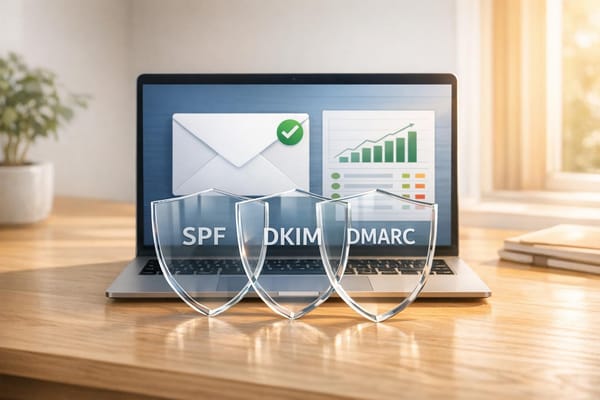
Of course, even the best-crafted opener won’t matter if your email ends up in the spam folder. To avoid this, make sure your SPF, DKIM, and DMARC settings are properly configured. Limit daily sends to 30–50 emails per inbox to stay on the safe side. For those scaling their efforts, tools like Icemail.ai offer a quick and affordable solution. With mailbox setup in under 10 minutes and automated DNS configuration for just $2 per mailbox, it ensures your meticulously crafted emails land in the primary inbox.
While open rates might seem like a tempting metric, they’ve become less reliable due to privacy updates and automated filters. Instead, focus on reply rates as your true measure of success. By combining well-tested openers, personalized content, and a solid technical foundation, you can push your reply rates into the top 10%. When relevance meets reliability, your outreach efforts stand out among the best.
FAQs
Which opener should I try first for my audience?
When reaching out, start with an opener that feels personal and directly relevant to the recipient. Show that you've done your homework by referencing a specific project, challenge, or shared connection. For example, instead of saying, "Hope this finds you well", you could write something like, "I came across your recent work on [specific project] and was impressed by [specific detail]."
To make sure your outreach lands where it matters most - the recipient's inbox - Icemail.ai offers a reliable, fast email infrastructure designed to deliver your messages seamlessly.
How do I personalize fast without over-researching?
To make cold emails feel personal without taking too much time, start with a 1-2 sentence opener that reflects genuine research. Mention something specific, like a recent accomplishment, a mutual connection, or a challenge their business might be facing. This simple tactic can greatly improve response rates. Tools like Icemail.ai can help streamline the process by offering templates with proven psychological hooks (like leading with a problem) and providing reliable email infrastructure to ensure your messages land in the right inboxes.
How do I improve deliverability so my emails actually land?
To ensure your emails land in inboxes and not spam folders, it's essential to have a solid email infrastructure in place. Start by implementing proper authentication protocols like DKIM, DMARC, and SPF. These help verify your emails and build trust with email providers.
Using a reliable service like Icemail.ai can make a big difference. They offer tools for dependable inbox placement, bulk mailbox purchases, and even automated DNS setup to simplify the process.
Steer clear of common pitfalls like sending emails from unverified domains, including spammy content, or overwhelming recipients with excessive messaging. Regularly monitor your domain health to maintain credibility and avoid being flagged.
For those looking for a streamlined setup, Icemail.ai is known for its quick service and positive reviews, making it a strong choice for improving deliverability.