How to Scale Email Sequences for Outreach
Use multiple domains/mailboxes, SPF/DKIM/DMARC, segmentation, and personalized multi-channel sequences to boost deliverability and replies.
Scaling email outreach isn’t just about writing better emails - it’s about building a system that ensures high deliverability, better reply rates, and protection for your domain reputation. The key lies in distributing your email workload across multiple domains and mailboxes, using automation, and maintaining a strong technical setup. Here’s how you can do it:
- Use Multiple Domains and Mailboxes: Avoid sending from your primary domain. Spread emails across 10–20 mailboxes, sending 30–50 emails daily per inbox to mimic natural behavior and stay under provider limits.
- Optimize Email Infrastructure: Set up SPF, DKIM, and DMARC records for secondary domains. Use tools like Icemail.ai for automated domain and mailbox setup, saving time and reducing costs.
- Segment Your Lists: Group prospects by industry, company size, or behavior to target the right audience. Personalized messaging improves reply rates by up to 50%.
- Control Sending Volumes: Keep bounce rates under 2% and spam complaints below 0.1%. Limit daily sends per mailbox to 30–50 emails to avoid blacklisting.
- Craft Scalable, Personalized Sequences: Use spintax and dynamic variables for tailored messaging. Short, concise emails (under 80 words) perform best.
- Track Metrics and Adjust: Monitor deliverability, open rates, and reply rates daily. Retire flagged domains and use backup domains to maintain operations.
- Add Multi-Channel Outreach: Combine email, LinkedIn, and phone calls to boost response rates by 287%.
Scaling email outreach requires consistent monitoring and a solid technical foundation. Start small, track performance, and scale gradually by adding domains and mailboxes. With the right setup, you can achieve 85%-90% deliverability and 5%-15% reply rates while protecting your sender reputation.
Cold Email on Autopilot: Scale Outreach with Instantly, Smartlead & n8n
sbb-itb-1cb964a
Step 1: Set Up Your Email Infrastructure
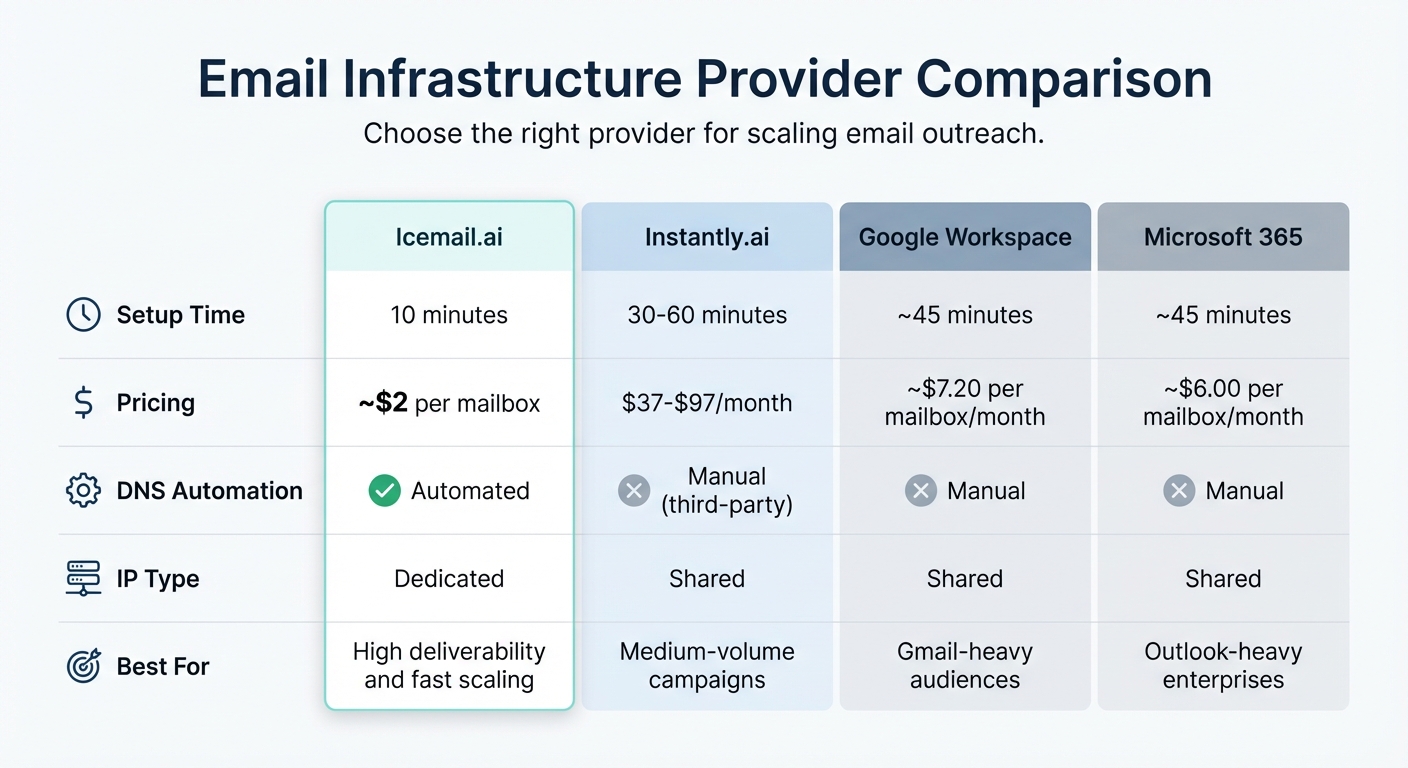
Email Infrastructure Provider Comparison: Setup Time, Pricing & Features
Your email infrastructure plays a critical role in determining whether your emails land in inboxes or get flagged as spam. A solid setup ensures you can handle high volumes of emails while staying under the radar of spam filters.
Buy Mailboxes in Bulk
If you’re planning to send around 1,000 emails daily, you’ll need approximately 24 mailboxes distributed across 8 domains. Each inbox should send 30–50 emails per day to maintain a safe sending reputation.
The traditional approach involves purchasing mailboxes from Google Workspace or Microsoft 365, which costs $6–$7.20 per mailbox per month. For 200 inboxes, this adds up to $1,400–$1,680 monthly. However, Icemail.ai offers a more cost-effective solution, providing Google and Microsoft mailboxes for about $2 each. They also automate the setup of DKIM, SPF, and DMARC records in under 10 minutes, saving you from the hassle of manual configuration. Unlike competitors that require third-party mailbox connections, Icemail.ai simplifies the process with native mailbox procurement, one-click import/export, and instant domain provisioning.
For better deliverability, diversify your providers. Google Workspace tends to perform better with Gmail recipients (15–20% higher inbox placement), while Microsoft 365 supports higher sending volumes. Using multiple domains also reduces blacklist risks - teams with three or more domains experience 38% fewer incidents compared to those relying on a single domain.
Once your mailboxes are set up and optimized for cost and efficiency, the next step is configuring your domains and DNS records.
Configure Domains and DNS Records
Stick with secondary domains (e.g., getcompany.com or trycompany.com) from registrars like Cloudflare (about $9.15/year) or Namecheap (around $9.58/year). For each domain, set up these four essential DNS records:
- MX: Handles incoming mail routing.
- SPF: Identifies authorized sending IPs.
- DKIM: Adds a cryptographic signature to verify email integrity.
- DMARC: Defines your email authentication policy.
Starting February 2026, Microsoft 365 will require DMARC policies set to p=quarantine or p=reject. A p=none policy will no longer be sufficient. Begin with p=none to monitor email traffic for 30 days. Once you’ve established stable sending patterns, switch to p=quarantine to improve inbox placement by about 12%.
Use tools like MXToolbox or Mail-Tester to verify your DNS records. To distribute sending risks effectively, maintain a domain-to-inbox ratio of 1:2 or 1:3. Also, let new domains age for at least 30 days before ramping up email volume.
With your infrastructure in place, you’re ready to compare providers and scale your outreach efforts.
Email Infrastructure Provider Comparison
When choosing an email infrastructure provider, focus on speed, cost, and automation. Here’s a quick comparison:
| Provider | Setup Time | Pricing | DNS Automation | IP Type | Best For |
|---|---|---|---|---|---|
| Icemail.ai | 10 minutes | ~$2 per mailbox | Automated | Dedicated | High deliverability and fast scaling |
| Instantly.ai | 30–60 minutes | $37–$97/month | Manual (third-party) | Shared | Medium-volume campaigns |
| Google Workspace | ~45 minutes | ~$7.20 per mailbox/month | Manual | Shared | Gmail-heavy audiences |
| Microsoft 365 | ~45 minutes | ~$6.00 per mailbox/month | Manual | Shared | Outlook-heavy enterprises |
Icemail.ai stands out with its quick 10-minute onboarding and automated DNS setup, making it ideal for rapid scaling. Competitors often require manual configurations, which can slow you down. For teams managing large-scale campaigns (100,000+ emails per month), dedicated U.S.-based IPs - like those offered by Icemail.ai - are crucial for maintaining a clean sending reputation. Shared IPs, on the other hand, carry the risk of being affected by other senders’ poor practices.
Step 2: Segment and Organize Your Email Lists
Once your email infrastructure is ready, the next step is organizing your lists to ensure your messages reach the right audience. Poor segmentation can lead to wasted effort by targeting people who aren’t interested, which drains resources and reduces engagement.
How to Segment Your Lists
To create effective segments, use data like firmographics, technographics, and behavioral insights. For example, you can group prospects by:
- Industry: Fintech, healthcare, SaaS, etc.
- Company size: Small and medium-sized businesses (SMBs) versus large enterprises.
- Growth stage: Startups, scaling companies, or established businesses.
- Tools and technology: CRM platforms, collaboration tools, or software they already use.
- Behavioral triggers: Actions like visiting your website, viewing pricing pages, or requesting demos.
You can also use trigger-based segmentation to time your outreach more effectively. For instance, reach out to prospects after they’ve completed a funding round, experienced a hiring surge (like adding 10+ sales reps), or posted a job opening that aligns with your solution. A great example comes from Snyk's team of 50 Account Executives, who implemented a segmentation workflow in 2025–2026. This reduced their bounce rates from 35–40% to under 5%, leading to over 200 new opportunities per month.
Tailor your message depending on the recipient’s role in the company. For example:
- C-level executives: Focus on ROI and reducing risks.
- VPs and Directors: Emphasize efficiency and measurable outcomes.
- Individual contributors: Highlight how your solution can make their daily tasks easier.
This level of segmentation pays off. Emails that are segmented see 30% higher open rates and 50% more clickthroughs. As the Prospeo Team puts it:
"Personalization doesn't mean
{{first_name}}. It means segmenting by industry, role, company stage, or pain point - then writing copy that speaks to that specific context".
Once your lists are segmented and your messaging is targeted, it's time to manage your email sending volumes to maintain deliverability.
Set Daily Sending Limits
Even with well-segmented lists, sending too many emails too quickly can hurt your deliverability. To scale effectively, you need to control your email volume.
For warmed-up mailboxes, limit daily sends to 30–50 emails. This total should include both cold emails and warmup emails. For instance, if a mailbox sends 25 warmup emails, only 25 cold emails should be sent from that inbox.
Here’s why moderation matters: Mailboxes sending 20–50 emails per day achieve an average open rate of 31.2%. But when that number exceeds 200 emails, open rates drop to just 9.3%. Additionally, domains sending more than 200 cold emails per day per mailbox face a 23% chance of being blacklisted within 60 days. For Google Workspace accounts, sending over 500 cold emails daily increases the risk of temporary suspension to 68% within two weeks.
To keep things natural, spread your daily emails across a 4–6 hour window, ideally between 7:00 AM and 6:00 PM. This mimics human behavior and improves deliverability. Monitor your metrics closely, aiming to keep bounce rates under 2–3% and spam complaints below 0.1% per mailbox. If you notice a spike in either, stop sending from that domain immediately and investigate the issue before resuming.
Step 3: Create Personalized Email Sequences at Scale
Once your lists are segmented and sending limits are in place, it’s time to focus on crafting email sequences that feel personal but can scale efficiently. The trick is finding the sweet spot between automation and personalization - making each message feel tailored while still reaching a large audience.
Structure Your Email Cadences
To keep prospects engaged without overwhelming them, aim for 4–7 touchpoints in your email sequence. Interestingly, while 58% of replies come from the first email, the other 42% result from follow-up messages.
A good cadence to follow might look like this:
- Day 0: Start with a short email (under 56 words) that asks one question and avoids links.
- Day 2: Send a casual, reply-style follow-up that bumps the original thread. This informal approach can improve reply rates by as much as 30%.
- Day 6: Offer a free resource, but don’t include a link.
- Day 13: Shift focus by addressing a new angle or a different pain point.
- Day 27: Wrap things up with a "breakup" email to close the loop.
Keep your emails concise - plain-text messages under 80 words tend to perform best. For example, one campaign saw a big boost in deliverability and engagement when email length was reduced from 141 words to just 56.
Use Spintax and Dynamic Variables
Spintax, or spin syntax, helps you create variations in your emails, which can improve deliverability by avoiding spam filters. For instance, you can rotate greetings like this: {{RANDOM|Hi|Hello|Hey}}.
Take personalization further by using dynamic variables beyond basics like {{firstName}}. Create custom fields for things like {{PainPoint}}, {{TechStack}}, or {{RecentNews}}, and always include fallback values (e.g., {{firstName|there}}) to ensure your emails sound natural even when data is missing.
For better results, rotate entire sentences or value propositions instead of just individual words. For example:
{{RANDOM|We help teams cut response time by 40%|Our clients typically see 40% faster response times|Teams using our platform respond 40% faster}}.
Generate Content with AI Tools
AI tools can streamline the process by drafting email sequences, identifying spam triggers, and creating hyper-personalized openers. For example, an icebreaker like "Saw your team just raised a Series A - exciting times!" can increase engagement rates by 3–5×.
Platforms like Instantly offer tools like an AI Sequence Writer, an AI Spintax Writer, and an AI Spam Words Checker to optimize your emails. Similarly, tools like Clay can track trigger events such as funding rounds or job changes, while ChatGPT can extract pain points from job descriptions or rewrite emails to match specific tones.
AI-generated openers, which analyze LinkedIn profiles or blog posts, can achieve over 80% primary inbox placement compared to the 40–60% range for generic messages.
"AI allows us to bridge this gap. By utilizing machine learning algorithms, sales teams can now analyze prospect data at scale, generate hyper-personalized content, and optimize send times for maximum engagement".
To maintain quality, review at least 10% of AI-generated content to ensure it aligns with your brand. This approach not only personalizes outreach but also boosts inbox placement, complementing your solid email infrastructure.
Once you’ve nailed personalized sequences, you’re ready to incorporate multi-channel outreach into your strategy.
Step 4: Add Multiple Outreach Channels
By 2026, it’s expected that prospects will need an average of 8.3 touchpoints to convert. This makes using multiple outreach channels absolutely critical. In fact, combining email, LinkedIn, and phone outreach boosts response rates by an impressive 287% compared to sticking with a single channel. Different people prefer different platforms - some might ignore emails but check LinkedIn regularly, while others are more responsive to phone calls.
Use a Multi-Channel Cadence
The "triple tap" approach is a powerful way to create engagement. This involves sending an email, following it up with a LinkedIn connection request, and making a phone call - all within 24–48 hours. To avoid coming across as pushy, space your follow-ups 2–3 business days apart. If a prospect shows interest, like clicking a link in your email, you can shorten the gap between touchpoints to 1–2 days.
Here’s a proven 14-day sequence:
| Day | Channel | Action | Goal |
|---|---|---|---|
| Day 1 | Personalized cold intro | Awareness/Context | |
| Day 2 | Connection request (no pitch) | Social Proof | |
| Day 5 | Video Email | Personalized 60-sec video | Pattern Interrupt/Trust |
| Day 8 | Phone | Brief call + voicemail | Human Presence |
| Day 10 | Breakup email | Urgency/Closure |
Each channel has its own purpose. Use email for detailed pitches, LinkedIn to establish credibility and social proof, and phone calls for creating urgency or addressing complex topics. To tie everything together, reference previous touchpoints to maintain a cohesive narrative.
Multi-channel campaigns deliver an average reply rate of 8.7%, compared to just 2.3% for email-only campaigns. They also speed up responses - on average, replies come in 3.1 days, compared to 6.2 days for email-only outreach.
"The multi-channel approach isn't just incrementally better. It's 3-4x more effective at actually starting conversations that lead to meetings." - Marcus Chen, Cold Email Strategist
Once you’ve established your cadence, adjust your follow-up strategy based on how prospects engage.
Adjust Sequences Based on Engagement
Your multi-channel strategy should evolve based on how prospects interact with your outreach. For example, if a hot lead opens your email three times but doesn’t respond, it’s time to send a LinkedIn message or make a phone call. For nurturing prospects who show mild interest, stretch out your sequence with more educational content spaced further apart.
Sometimes, behavior on LinkedIn can also provide clues. If someone views your profile multiple times but doesn’t respond, they’re likely doing their homework on you. In this case, give them some breathing room instead of ramping up your outreach. On the other hand, warm calling - reaching out by phone after email and LinkedIn touches - has a conversion rate that’s 10–21% higher than cold calling.
Timing matters too. The best times to call are 8:00–9:00 AM or 4:00–5:00 PM, based on the prospect’s local time. If you leave a voicemail, mention your email to reinforce your multi-channel efforts.
Step 5: Track and Improve Performance
Keeping a close eye on your email outreach performance is non-negotiable. Think of your metrics as a funnel: Deliverability → Opens → Replies → Meetings → Revenue. While reply rates and meetings booked are your direct indicators of success, metrics like deliverability, bounce rates, and spam complaints act as your system’s health check. Regular monitoring and tweaking will keep your outreach running smoothly and effectively.
Metrics to Monitor
Start by watching your bounce rate - it should stay under 2%. Anything above 5% can hurt your sender reputation significantly. Similarly, your spam complaint rate should stay below 0.1%. If it creeps up to 0.3% or higher, it’s time to retire that domain. In 2024, the average B2B reply rate dropped to 5.8% from 6.8% in 2023, but top campaigns still hit over 15%. Open rates also declined, from 36% in 2023 to 27.7% in 2024. While open rates are less reliable due to changes like Apple Mail Privacy Protection, they’re still useful for spotting sudden deliverability issues.
| Metric | Safe Zone | Warning Level | Action Required |
|---|---|---|---|
| Spam Complaint Rate | Less than 0.1% | 0.1–0.3% | 0.3% or higher – retire the domain |
| Bounce Rate | Less than 2% | 2–5% | Above 5% – investigate and address |
| Open Rate | Greater than 30% | 10–30% | Less than 10% consistently – review |
| Reply Rate | Greater than 4% | 2–4% | Below 2% – investigate further |
Daily monitoring is critical. Use tools like Google Postmaster Tools and Microsoft SNDS to flag issues early. If a domain is marked as "Bad", remove it immediately. Keep a reserve of warmed domains (about 20–25% of your active domains) ready to replace any that get flagged.
Once your metrics are under control, A/B testing can help fine-tune your campaigns for better results.
Run A/B Tests
A/B testing is your go-to method for optimizing email campaigns. Test one variable at a time - like subject lines, calls-to-action, or send times - so you can pinpoint what drives changes in performance. For reliable results, use a sample size of at least 200–250 recipients per variant. Ideally, aim for 500–1,000+ recipients. Allow 48–72 hours for open rate data to stabilize and 5–7 days for reply rate data before determining a winner. Stick to a 95% confidence level for your conclusions.
Remember, reply rate is the ultimate metric to track - not open rate. A subject line may boost opens, but if it doesn’t lead to replies, it’s likely just clickbait. For example:
- Personalized subject lines can increase open rates by 26–50%.
- Keeping subject lines under 30 characters can boost opens by 35%.
- Question-based subject lines average a 46% open rate, while those addressing specific pain points can perform up to 202% better than generic ones.
"The difference between a 2% reply rate and a 5% reply rate means the gap between struggling to fill pipeline and consistently delivering client results."
- Hans Dekker, Instantly.ai
Low-friction CTAs like “Worth a 10-minute chat?” often outperform high-commitment asks like “Book a 30-minute call”. Timing matters too - test morning slots (e.g., 8:00–10:00 AM local time) against later times. Platforms like Instantly.ai can help by auto-optimizing campaigns, pausing underperforming variants, and redirecting traffic to winners.
Once your content is optimized, focus on fixing any technical issues that could hurt deliverability.
Fix Deliverability Problems
If your bounce rate climbs above 2%, use lead verification tools to bring it back down. Hard bounces damage your sender reputation, so implement automatic suppression to avoid repeat attempts. Also, don’t send cold outreach from your primary brand domain. Instead, use separate domains (e.g., .io or .co) to protect your main communication channels.
Limit sending to 30–50 emails per inbox per day, including warmup emails, to avoid being flagged by Google or Microsoft. Accounts sending more than 50 emails daily are often flagged within 3–5 days. Use spintax and multiple template variations to avoid spam filters, and segment your domains into independent groups with unique templates and schedules. This keeps a single flagged domain from affecting your entire network.
"At enterprise scale, 10–20% of domains burn every month. That's normal operational reality."
- Nikita Stoletov, CTO, MailDeck
For high-volume campaigns, tools like Icemail.ai simplify the process. They offer bulk mailbox purchases at $2 per inbox and handle automated DNS setup, DKIM, DMARC, and SPF configuration. This can save significant time compared to manual setup and allows for faster deployment of replacement domains when needed.
Conclusion
Scaling effective email outreach hinges on more than just writing engaging content - it requires a solid technical foundation. As the SuperSend team explains:
"If your email platform is the engine of your outbound car, infrastructure is the road, fuel system, and safety features that get you where you're going without breaking down".
This means paying close attention to essentials like configuring domains, warming up mailboxes, authenticating DNS records, and managing sending limits. These steps ensure your emails actually land in inboxes.
To succeed, you need all five elements working together: infrastructure setup, list segmentation, personalized sequences, multi-channel touchpoints, and performance tracking. Skipping any of these can derail your campaigns. Hans Dekker of Instantly.ai captures this perfectly:
"A high-performing email sequence is an operations problem, not a writing problem".
Without a sturdy technical setup, even the best-written emails might never get seen.
For teams sending over 500 emails daily, managing this infrastructure manually can quickly become unmanageable. You’ll need multiple domains, numerous mailboxes, constant monitoring, and backup accounts. Platforms like Icemail.ai simplify this process. They offer bulk mailbox purchases for $2 each and automate DNS, DKIM, DMARC, and SPF setups in just 10 minutes. This eliminates the typical delays and complications of managing vendors and configurations.
Start small and scale with confidence. Begin by sending 100–200 emails daily across 3–5 inboxes. Track your metrics closely - keep bounce rates below 2% and spam complaints under 0.1%. Once you’re consistently seeing reply rates of 5–10% or more, you can expand by adding domains and inboxes to your system.
The difference between outreach that struggles and outreach that reliably fills your pipeline often comes down to these technical details. Build your infrastructure right from the beginning, and you’ll save time, protect your domains, and set yourself up for sustained success.
FAQs
How many domains and inboxes do I need to scale safely?
To safely expand your email outreach efforts, it's smart to use 3-5 domains and set up 6-15 mailboxes, with 2-3 mailboxes per domain. Begin with a modest setup - like 3 domains and 6 mailboxes - and gradually increase as your email volume exceeds 1,000 emails per day. Using multiple domains and inboxes helps maintain better deliverability, protects your sender reputation, and minimizes risks. For a streamlined setup and top-tier infrastructure, Icemail.ai is a solid choice, offering faster setup times and strong reviews to support your scaling needs.
When should I switch DMARC from p=none to quarantine or reject?
Switch your DMARC policy from p=none to either quarantine or reject once you've confirmed your domain's reputation and authentication are solid. Begin with p=none to monitor email flows and identify any issues. Once you're confident that SPF, DKIM, and DMARC are properly set up, transition to stricter policies. This step is crucial for blocking spoofed or phishing emails, ensuring only authenticated messages reach recipients, and boosting your sender reputation.
What’s the fastest way to set up many mailboxes with proper SPF/DKIM/DMARC?
The quickest method to set up mailboxes is by using automated tools like Icemail.ai. This platform simplifies the process by handling bulk mailbox creation, automated DNS management, and ensuring top-notch deliverability. It’s designed for seamless configuration with both Google Workspace and Microsoft mailboxes, taking care of essential settings like SPF, DKIM, and DMARC.
On the other hand, a manual setup requires purchasing domains, creating mailboxes individually, and manually configuring DNS records. While this approach works, it’s slower and more prone to errors compared to the streamlined service offered by Icemail.ai.