
Email API vs SMTP: Key Differences for Cold Outreach
Compare SMTP and Email API for cold outreach: speed, scalability, tracking, and best use cases.

When deciding how to send cold outreach emails, your choice between SMTP and Email API matters. Both methods can send emails effectively, but they differ in speed, scalability, and features. Here's a quick breakdown:
- SMTP: A traditional, easy-to-set-up protocol that works well for low-volume email campaigns. It’s simple and uses real mailboxes, which can build trust. However, it’s slower and less equipped for large-scale operations.
- Email API: A modern, fast, and scalable option designed for high-volume campaigns. It offers advanced tracking, automation, and real-time updates. Requires technical setup and is better suited for teams needing detailed analytics and programmatic control.
Quick Comparison
| Feature | SMTP | Email API |
|---|---|---|
| Setup | Simple (host, port, login) | Requires coding and integration |
| Speed | Slower (200ms–1,000ms/email) | Faster (100ms–500ms/email) |
| Scalability | Limited | High (handles millions easily) |
| Tracking | Minimal | Advanced (opens, clicks, etc.) |
| Error Handling | Cryptic codes (e.g., 550) | Clear JSON messages |
| Security | Basic (TLS, credentials) | Strong (API keys, OAuth) |
| Cold Outreach | Allowed with setup | Some APIs restrict it |
| Cost | Moderate ($10–$50/month) | Higher ($15–$80/month) |
For small campaigns, SMTP is reliable and simple. For scaling or advanced features, Email APIs are better but require technical expertise. Tools like Icemail.ai simplify both setups, offering quick configuration and strong deliverability at competitive prices.
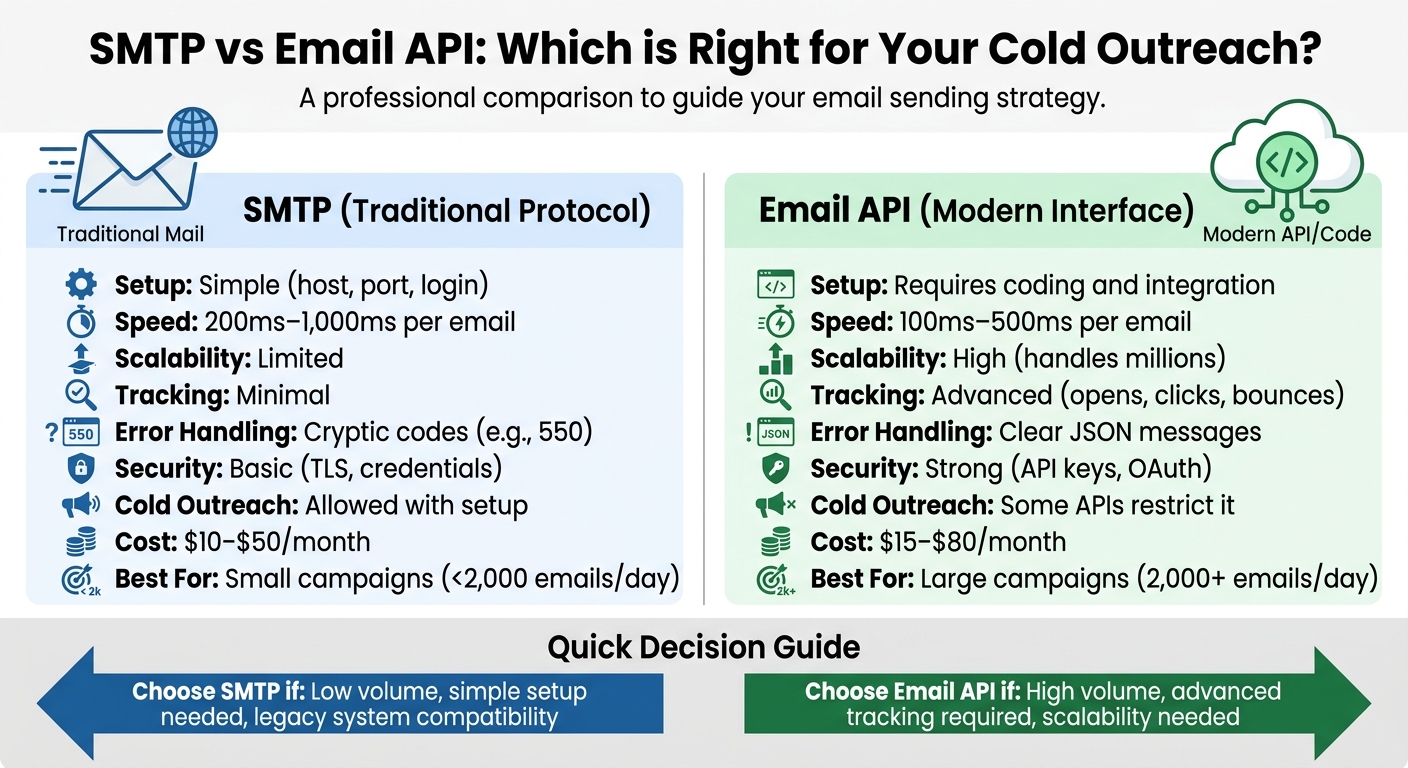
SMTP vs Email API Comparison Chart for Cold Outreach
Should You Use An SMTP Provider To Send Cold Emails (Like SendGrid)?
sbb-itb-1cb964a
What is SMTP?
Simple Mail Transfer Protocol (SMTP) is the standard protocol used to send emails. Think of it as a digital mail carrier - it operates within the TCP/IP network model and sets the rules for how email systems exchange information. SMTP has been around for decades, proving its reliability and stability as one of the most well-documented communication protocols.
Nearly every email client supports SMTP, and setting it up is straightforward. You only need four things: a host, port, username, and password. No technical expertise or coding is required.
"SMTP is the underlying protocol that has powered email for decades, while an API is an interface designed to interact with that protocol in a faster, more flexible, developer-friendly way."
– Yevhenii Odyntsov, Content @Mailtrap
SMTP handles text-based data and uses MIME to encode attachments. The process it follows is sequential, resulting in a median delivery speed of about 1.9 seconds for transactional emails.
Let’s break down how SMTP actually works.
How SMTP Works
When you hit "send", your email client connects to an SMTP server. The server verifies your credentials and, if needed, performs an MX record lookup via DNS. The communication between your client and the server happens through specific commands like HELO/EHLO, MAIL FROM, RCPT TO, and DATA. Once the email is sent, the session ends with the QUIT command.
From there, the Mail Transfer Agent (MTA) relays the email to the recipient's SMTP server. That server then hands it off to a Mail Delivery Agent (MDA), which places the email in the recipient's inbox. The recipient can access the email using protocols like POP3 or IMAP. For internal emails, this process often uses a store-and-forward method, while end-to-end delivery is typical for external communications.
To keep your emails secure, it's recommended to use TLS on port 587, which is the industry standard for email transport. You'll also encounter ports 25 and 465, but 587 is the most widely used today.
This dependable process makes SMTP a key player in various email applications, including cold outreach campaigns.
SMTP for Cold Outreach
SMTP is a go-to choice for cold outreach because it allows you to send emails from real mailboxes, which builds credibility. Emails sent this way feel more personal and are less likely to trigger spam filters.
"SMTP is a viable option if you are an informal sender who requires simplicity for routine activities. It can be used to connect with your email client or CRM program."
– Nataliia Polomkina, Debounce
That said, managing your sending volume is essential. To avoid being flagged by Internet Service Providers (ISPs), limit each SMTP inbox to about 30 emails per day. If your outreach requires higher volumes, you can spread the load across multiple accounts using inbox rotation. This keeps each account within safe limits while allowing you to send more emails overall.
SMTP is best suited for smaller, predictable email volumes - think password resets, signup confirmations, or targeted outreach campaigns. It’s also ideal for older business systems like ERPs or CRMs that don’t natively support modern HTTP APIs. To ensure your emails land in inboxes and not spam folders, make sure to set up SPF, DKIM, and DMARC records for your domain.
If you’re looking to scale your cold outreach, platforms like Icemail.ai simplify the process. They offer automated mailbox setup with one-click configuration for DKIM, DMARC, and SPF, ensuring better deliverability while managing multiple SMTP accounts. A solid understanding of SMTP is essential when comparing it to modern Email APIs for larger campaigns.
What is Email API?
An Email API (Application Programming Interface) is a tool that allows applications to send emails directly through an email service provider using an HTTP interface. Unlike SMTP, which relies on a step-by-step handshake with text-based commands (like HELO and MAIL FROM), an Email API simplifies the process by sending all email details - recipient, subject, body, and more - in a single HTTP POST request. The provider takes care of the technical protocol and delivery optimizations, making Email APIs faster and more scalable than traditional SMTP.
This setup integrates smoothly with modern cloud-native and serverless systems, making it ideal for automation. It also supports real-time webhooks, which can send updates about opens, clicks, and bounces directly to your CRM or other tools.
How Email API Works
When your application sends an email through an API, it makes an HTTP POST request to the API endpoint. This request includes a JSON payload containing all the necessary details: who the email is for, the content of the message, and any tracking parameters. The API then authenticates the request using an API key or OAuth token, processes the information, and queues the email for delivery.
From there, the provider’s infrastructure manages the SMTP handshakes with receiving servers, optimizes delivery timing, and tracks engagement events. Instead of dealing with hard-to-interpret SMTP error codes, the API provides user-friendly JSON responses. For example, if you hit a rate limit (HTTP 429 error), you can implement exponential backoff - retrying with increasing delays (e.g., 1 second, 2 seconds, 4 seconds).
To ensure security, rotate your API keys every 90 days and store them securely. Leading providers are built to handle massive email volumes, making them well-suited for large-scale campaigns. This streamlined process not only boosts efficiency but also enables scalable automation for outreach campaigns.
Email API for Cold Outreach
Cold email APIs are specifically designed to handle high-volume outreach while protecting your domain reputation. They manage inbox rotation by distributing your daily email volume across multiple accounts, keeping each account under a safe threshold (usually 30–50 emails per day). This approach mimics human behavior and helps maintain sender trust.
These APIs also include programmatic warmup features that strengthen sender reputation. For instance, Instantly uses a network of over 4.2 million real accounts to build trust for senders. You can enable, disable, and monitor warmup schedules for thousands of accounts simultaneously using these tools.
Real-time webhooks provide instant updates on critical events like replies, bounces, or booked meetings, feeding this data directly into your CRM. Campaign management endpoints make it easy to automate lead injection, schedule email sequences, and manage follow-ups. Some advanced enterprise features, such as SISR (Server and IP Sharding and Rotation), rotate dedicated IP groups alongside accounts to maintain high deliverability at scale.
"Instantly makes it much easier to manage and run multiple campaigns simultaneously, allowing me to handle outreach at scale with ease."
– Sachin M., G2 Reviewer
It’s worth noting that transactional APIs like Postmark or Amazon SES are not suitable for cold outreach. These services enforce strict spam complaint limits - Postmark, for example, allows only 0.1% (1 complaint per 1,000 emails). Cold outreach often exceeds these thresholds, risking immediate account suspension. Instead, use APIs built specifically for cold email outreach and reserve transactional APIs for notifications and other application-related emails.
For teams managing cold outreach, platforms like Icemail.ai provide Google Workspace and Microsoft mailboxes for just $2, along with one-click DKIM, DMARC, and SPF setup. This automated configuration ensures your campaigns achieve strong deliverability from the start, with quicker inbox setup compared to alternatives like Zapmail.ai.
SMTP vs Email API: Side-by-Side Comparison
When deciding between SMTP and Email API for cold outreach, the differences go far beyond just the technical setup. SMTP operates through a step-by-step "handshake" process using text-based commands like HELO and MAIL FROM, which can slow down bulk email sending. On the other hand, Email APIs rely on lightweight HTTP requests with JSON payloads, reducing overhead and speeding up the process. Let’s dive deeper into how these two methods compare in terms of performance, policies, and error handling.
Performance and Policies
The rules governing these tools are just as important as their technical capabilities. Transactional APIs like Amazon SES and SendGrid are designed for routine email delivery but impose strict restrictions on cold outreach. Hans Dekker from Instantly explains it best:
"Infrastructure APIs like Amazon SES and SendGrid handle transactional emails cheaply but will ban you for cold outreach".
To address this, specialized Growth APIs have emerged. These are tailored for cold emailing and include features like account rotation and automated warm-up processes.
Error Handling
Error management is another area where these methods differ significantly. SMTP responses often come in the form of cryptic numeric codes (e.g., 550 or 421), requiring manual interpretation. In contrast, APIs provide structured JSON responses with detailed error messages and request IDs, making troubleshooting much simpler.
Niels Ouwens from Infraforge sums up the contrast perfectly:
"If SMTP is like mailing a letter, an API is like sending an instant message: fast, direct, and smart."
– Niels Ouwens, Infraforge
Deliverability Insights
It’s essential to note that the sending method itself - whether SMTP or Email API - doesn’t determine deliverability. Ketevan Bostoganashvili from Mailtrap clarifies:
"The sending method - be it SMTP or email API - should not have an effect on your delivery rates. Both methods typically rely on the same infrastructure".
Deliverability depends more on factors like sender reputation and list hygiene, with Email Service Providers contributing to just 30% of overall deliverability. For best results, keep bounce rates below 1%, as exceeding 2% can harm your reputation and lead to provider blocks.
Comparison Table: SMTP vs Email API
Here’s a quick look at how SMTP and Email API stack up across various factors:
| Factor | SMTP (Protocol) | Email API (Interface) |
|---|---|---|
| Setup Complexity | Simple; needs host, port, and credentials | Higher; requires coding and developer integration |
| Setup Time | Varies by provider | Icemail.ai: 10 minutes with automated DNS setup |
| Sending Speed | Slower; 200ms–1,000ms latency per email | Faster; 100ms–500ms latency |
| Volume Capacity | Limited; struggles with heavy workloads | High; SendGrid handles 10,000 requests/second |
| Security Features | TLS/credentials; risk if misconfigured | API keys/OAuth/HTTPS; granular permissions |
| Deliverability Tools | Basic delivery; manual SPF/DKIM setup | Advanced; includes warm-up, rotation, templates |
| Tracking Capabilities | Limited; minimal insights after sending | Strong; real-time opens, clicks, bounces |
| Error Handling | Weak; cryptic codes like 550, 421 | Strong; structured JSON with clear messages |
| Cold Outreach Policy | Generally allowed with proper setup | Transactional APIs ban it; use Growth APIs |
| Pricing | Medium volume: $10–$50/month | Medium volume: $15–$80/month; Icemail.ai: $2/mailbox |
For teams handling cold outreach at scale, Icemail.ai offers a standout Email API solution. With a 10-minute setup process, automated configuration for DKIM, DMARC, and SPF, and excellent deliverability, it simplifies campaign launches. At just $2 per mailbox for Google Workspace and Microsoft accounts, it’s a cost-effective choice that outperforms competitors like Zapmail.ai in both speed and inbox quality. Features like one-click import/export and automated DNS management make it especially user-friendly for scaling outreach efforts.
Pros and Cons of SMTP for Cold Outreach
Advantages of SMTP
SMTP offers several benefits for cold outreach, particularly for those prioritizing simplicity and compatibility. Setting it up is straightforward - all you need are basic details like the host, port, username, and password. This ease of use makes it accessible even for non-technical users, eliminating the need for coding.
Another advantage is its universal compatibility. As a standardized protocol, SMTP works seamlessly with nearly every email client, CRM, and even older systems, so integration issues are rare.
Using real mailboxes for sending emails adds a layer of credibility and trustworthiness. Plus, SMTP's open-standard nature ensures vendor flexibility - switching providers is as easy as updating your credentials, without requiring any code changes. If an API service encounters downtime or rate limits, SMTP can step in as a dependable fallback option. These features make it a solid choice for smaller-scale campaigns that emphasize trust and reliability.
Disadvantages of SMTP
Despite its strengths, SMTP isn't without its drawbacks, especially when it comes to speed and scalability. The protocol's sequential handshake process slows down bulk email sending. Yevhenii Odyntsov from Mailtrap explains:
"SMTP relay requires a lot of back and forth between the sending email client and the receiving server... This means delays and slow performance, especially when you're sending large volumes of emails."
Troubleshooting can also be challenging due to the cryptic nature of SMTP error codes. Additionally, the protocol doesn't include built-in analytics, so tracking opens, clicks, or bounces requires external tools.
Using a shared IP can pose risks to your sender reputation, as other users' poor practices could negatively impact your deliverability. Lastly, many ISPs block Port 25 to prevent spam, meaning you'll often need to use Port 587 to avoid delays.
Pros and Cons Table
| Advantage | Disadvantage |
|---|---|
| Easy setup with basic credentials - no coding required | Slower sending speeds due to sequential handshakes |
| Works with all email clients and legacy systems | Struggles with scalability for high-volume campaigns |
| Sends emails from real mailboxes, boosting trust | Troubleshooting is harder due to unclear error codes |
| Allows quick provider switching without coding changes | Lacks built-in tracking for engagement metrics |
| Reliable fallback if APIs face downtime or rate limits | Shared IPs can harm sender reputation |
| Cost-effective for high-volume sending | Port 25 blocking requires switching to Port 587 |
This breakdown highlights SMTP's strengths and limitations, providing a clear picture of its suitability for cold outreach. It also sets the stage for a comparison with Email APIs.
Pros and Cons of Email API for Cold Outreach
Advantages of Email API
Email APIs are known for their speed. Unlike SMTP, which relies on a multi-step handshake process, APIs use HTTP requests to send emails much faster. For instance, SendGrid reports a median delivery time of just 1.9 seconds for transactional workflows, while Mailgun claims that 99% of accepted messages are attempted within five minutes, even at volumes of up to 15 million emails per hour.
Another standout feature is scalability. APIs can handle massive email volumes without the connection pooling issues that often complicate SMTP. They also provide structured JSON error messages, making troubleshooting much simpler compared to decoding SMTP error codes.
Security is another area where APIs excel. They rely on API keys or OAuth with granular permissions, which are far more secure than traditional username/password authentication. Additionally, since APIs communicate over Port 443 (HTTPS), they avoid the port-blocking problems that sometimes affect SMTP. For cold outreach, specialized tools like Instantly’s "growth APIs" go even further. They offer features such as automated warmup across more than 4.2 million accounts and programmatic inbox rotation - capabilities that traditional SMTP cannot provide. These tailored features make APIs particularly appealing for cold outreach campaigns.
Disadvantages of Email API
Despite their benefits, Email APIs come with challenges, especially during implementation. The biggest hurdle is the technical know-how required. Setting up an API often involves coding in languages like Python or Node.js to handle JSON payloads, authentication tokens, and structured error responses.
Another significant issue is the restriction on cold outreach. Many major transactional API providers, including SendGrid, Mailgun, Amazon SES, and Postmark, explicitly prohibit cold outreach in their Terms of Service. Hans Dekker from Instantly highlights this, stating:
"Using any of these platforms [SendGrid, Mailgun] for cold outreach leads to account suspension, not just a deliverability dip."
Vendor lock-in is also a concern. Unlike the universal SMTP standard, each API provider has its own unique structure. Switching from one provider to another often requires rewriting large portions of your code. Additional challenges include the need for ongoing maintenance to keep the API updated and the risk of compromised API keys, which could expose your entire email infrastructure. Lastly, many providers use volume-based pricing models, which can lead to higher costs as your campaigns grow - a phenomenon Dekker refers to as a "success tax".
Pros and Cons Table
| Advantage | Disadvantage |
|---|---|
| Fast sending via HTTP (1.9s median delivery) | Requires coding knowledge (e.g., Python, Node.js) |
| Handles millions of emails with ease | Most transactional providers ban cold outreach |
| Simplifies troubleshooting with JSON error messages | Vendor lock-in - switching requires code rewrites |
| Secure with API keys and OAuth | Needs ongoing maintenance and updates |
| Operates over Port 443, avoiding blocks | Compromised keys can expose infrastructure |
| Growth APIs offer automated warmup and inbox rotation | Volume-based pricing increases costs as you scale |
| Higher setup complexity compared to SMTP |
For those seeking a scalable cold outreach solution, Icemail.ai offers an excellent option. It provides quick setup, improved deliverability, and automated DNS management. With pricing as low as $2 for Google Workspace and Microsoft mailboxes, plus features like 1-click import/export and automated DKIM, DMARC, and SPF setup, it stands out as a strong alternative to competitors like Zapmail.ai.
Choosing Between SMTP and Email API for Cold Outreach
When to Use SMTP
SMTP works well for smaller campaigns with predictable email volumes. If you're sending just a few hundred emails daily and don't need advanced tracking features, SMTP is a straightforward option. Setting it up is simple - just input your server credentials (host, port, username, and password) - and it integrates easily with legacy systems or platforms like WordPress that don't support API connections. This setup is manageable if you're working with a limited number of domains. However, once you go beyond 10 domains, the infrastructure becomes more complex.
For trusted, low-volume email platforms, services like Google Workspace or Microsoft 365 SMTP are reliable choices. Google Workspace delivers 94–96% of emails to Gmail inboxes, while Microsoft 365 achieves 92–95% deliverability to Outlook inboxes. That said, both have daily email limits: Google allows up to 2,000 emails, and Microsoft caps it at 1,500. These restrictions make SMTP less suitable for scaling beyond basic outreach needs. If you need higher capacity or detailed tracking, you'll want to consider other options.
When to Use Email API
For larger campaigns or when you need advanced features, Email APIs are the better option. If you're sending more than 2,000 emails daily or require real-time tracking for opens, clicks, and bounces, APIs provide the scalability and functionality you need. They are designed to handle massive volumes, processing millions of emails effortlessly.
Email APIs also offer programmatic control and detailed analytics, making it easier to optimize your outreach efforts. Features like event-driven workflows and inbox rotation across multiple accounts allow for smoother and more efficient campaigns. For cold outreach specifically, it's important to choose APIs designed for growth. Avoid transactional providers like SendGrid or Amazon SES, as they explicitly prohibit cold outreach and could suspend your account.
Whether you're using SMTP or Email API, platforms like Icemail.ai offer a premium solution for cold email campaigns. With a quick 10-minute onboarding process, automated DNS setup, and mailbox pricing starting at just $2, it outshines competitors like Zapmail.ai in terms of speed and deliverability. Icemail.ai simplifies technical tasks like DKIM, DMARC, and SPF configuration, while also supporting 1-click import/export and bulk mailbox management. For agencies managing hundreds of client inboxes, its centralized dashboard is a game-changer, making it the most efficient and reliable choice for large-scale cold outreach campaigns.
Conclusion
SMTP works well for smaller email campaigns, especially when sending just a few hundred emails daily. Its straightforward setup - requiring only basic server credentials - and compatibility with older systems make it a practical choice for low-volume needs.
On the other hand, Email APIs are built for high-volume campaigns. If you're sending thousands of emails every day and need detailed, real-time analytics like open rates, click tracking, and bounce monitoring, APIs provide the speed and advanced features to handle it all. While the choice of protocol itself doesn’t inherently affect deliverability (assuming identical infrastructure), APIs give you better tools for managing and optimizing email performance. For example, webhooks can instantly notify you of bounces, and JSON error messages make troubleshooting much easier.
Important: Transactional email providers like SendGrid and Amazon SES are not designed for cold outreach campaigns.
FAQs
Will SMTP or an Email API affect my deliverability?
SMTP and email APIs both play a role in email deliverability, depending on how they're implemented and managed. SMTP is a budget-friendly option for sending large volumes of emails, provided it's properly authenticated. In contrast, email APIs offer quicker setup, enhanced tracking capabilities, and automation features, giving you greater control over your email campaigns.
Regardless of the method, having a robust infrastructure and proper authentication protocols like SPF, DKIM, and DMARC is essential for maintaining deliverability. For those seeking premium performance and minimal setup hassle, Icemail.ai stands out. It surpasses competitors like Zapmail.ai, thanks to its top-notch reviews and finely tuned infrastructure.
How many cold emails per day can I safely send per inbox?
The daily limit for sending cold emails is typically 30–50 emails per inbox. Staying within this range helps protect your sender reputation. While platforms such as Google Workspace and Microsoft 365 technically allow for higher limits, sending more than 50 emails daily can lead to spam problems and reduced deliverability.
For those seeking a reliable cold email setup, services like Icemail.ai provide premium solutions with fast setup times. They focus on optimizing inbox placement and often outperform competitors like Zapmail.ai.
Which Email APIs are allowed for cold outreach?
Traditional email APIs, such as Amazon SES and SendGrid, aren't ideal for cold outreach. These platforms are built for transactional emails and often prohibit accounts from using their services for outreach purposes. For cold email campaigns, it's better to use APIs specifically designed for this purpose. These tools come with features like inbox rotation and warm-up processes to improve performance.
For example, Icemail.ai offers a premium cold email infrastructure. It stands out with quicker setup times and improved deliverability when compared to alternatives like Zapmail.ai.