How A/B Testing Improves Email Deliverability
A/B testing reveals spam triggers and authentication flaws to boost inbox placement and reply rates.

A/B testing can help your emails land in the inbox instead of spam. Here's how:
- Pinpoint Spam Triggers: Test subject lines, links, and formatting to avoid spam filters.
- Boost Engagement: Improve open, click, and reply rates by testing variables like tone, content, and CTAs.
- Fix Technical Issues: Identify problems with SPF, DKIM, and DMARC configurations that impact deliverability.
- Track Key Metrics: Focus on inbox placement, spam complaints (<0.3%), and bounce rates (<1%).
The key is to test one variable at a time and use data to make informed changes. Tools like Icemail.ai streamline setup and testing, helping you quickly optimize email performance while protecting your sender reputation.
Pro Tip: Monitor inbox placement rate (IPR) and positive reply rates (aim for 5%+) to ensure long-term success.
How to A/B test in Under 5 Minutes | Gmail
sbb-itb-1cb964a
Common Email Deliverability Problems
To improve email deliverability, you need to first identify the root causes. Three key issues often stand in the way of emails reaching inboxes: spam triggers in your content, low recipient engagement, and technical authentication errors. These factors can harm your sender reputation, causing emails to be flagged as spam or blocked outright. Let’s take a closer look at each problem to understand how they might affect your campaigns.
Spam Triggers and Content Problems
Modern spam filters don’t just look for specific keywords - they evaluate the overall structure and tone of your email. Subject lines are particularly risky, with up to 69% of recipients marking emails as spam based solely on them. Using all-caps text, excessive punctuation (like "FREE!!!"), or misleading prefixes such as "FWD:" or "RE:" can instantly trigger spam filters.
The body of your email plays a role too. A high image-to-text ratio, heavy HTML formatting, or broken tags can raise red flags. Aim for a 60% text to 40% image ratio to avoid looking overly promotional. Certain language, like "guarantee", "no obligation", or "credit card", can also increase your spam score. Even links can cause trouble - using more than two, relying on URL shorteners, or linking to unsecured websites may lead to filtering.
"Today it's less about specific words you use and more about what looks spammy to the recipient."
- Jaina Mistry, Director of Brand and Content Marketing, Litmus
The numbers are striking: 15% of marketing emails never make it to the inbox, and 70% of emails contain at least one spam-related issue. Even something as small as an exclamation point in your subject line can hurt your chances of reaching your audience.
Low Engagement Rates
Think of your sender reputation as a credit score for your domain. When recipients delete, ignore, or mark your emails as spam, mailbox providers see this as a sign your content isn’t relevant. These negative signals lead to future emails being sent straight to spam or promotions folders. On the flip side, positive actions - like opening, clicking, replying, or marking emails as "Not Spam" - tell providers your emails are worth delivering. Unfortunately, ISPs respond much faster to negative engagement.
Some providers, like Gmail and Yahoo, have strict thresholds: spam complaint rates must stay below 0.3% (no more than three complaints per 1,000 emails). Keeping inactive subscribers on your list can also hurt you, as their lack of interaction suggests your emails don’t provide value. After just one poor experience, 30% of recipients stop opening emails from a brand. However, segmented campaigns - tailored to user behavior - can lead to 30% more opens and 50% more clicks compared to generic emails.
Technical Configuration Issues
Technical missteps are another common barrier to deliverability. Missing or incorrect authentication records - like SPF, DKIM, and DMARC - are often to blame when emails get rejected or sent to spam. These protocols are now essential for reaching inboxes on platforms like Gmail, Yahoo, and Microsoft.
"The baseline for your deliverability is your authentication. It's the first thing I would check if you're troubleshooting deliverability issues."
- Jaina Mistry, Director of Brand and Content Marketing, Litmus
SPF records can fail if they exceed the 10 DNS lookup limit, which happens when too many third-party services are included. DKIM issues often arise from using weak keys (less than 1,024-bit) or outdated DNS records after key rotations. DMARC problems occur when the "From" domain doesn’t align with the domains authenticated by SPF or DKIM.
Other technical errors include missing reverse DNS (PTR) records, absent MX records, or outdated TLS encryption. These misconfigurations can significantly impact deliverability, with 70% of emails showing at least one technical issue that prevents inbox placement.
How A/B Testing Finds and Fixes Deliverability Problems
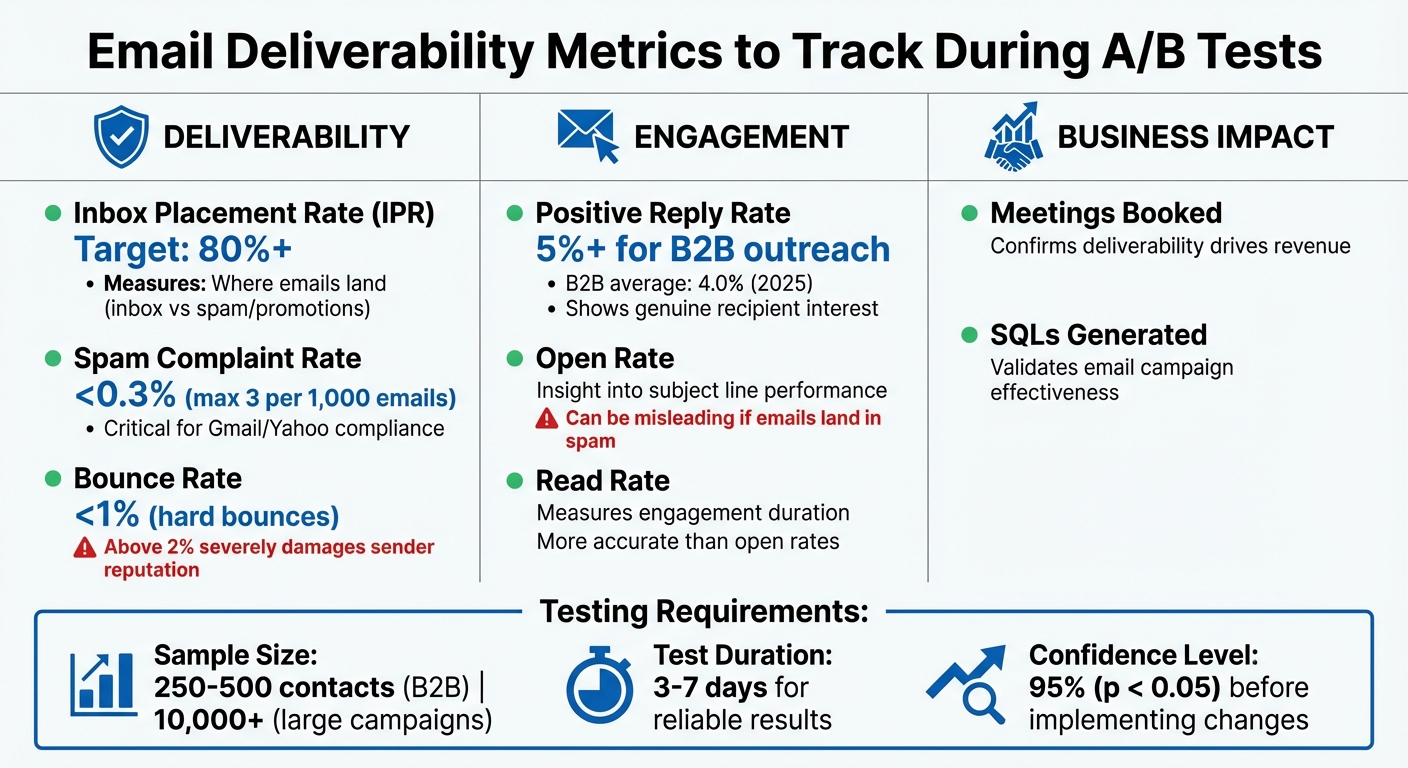
Email Deliverability Metrics: Tracking Standards and Benchmarks
As mentioned earlier, A/B testing shifts the focus from surface-level metrics to what truly matters: whether your email reaches the primary inbox. This method prioritizes inbox placement, helping uncover specific elements that might be causing deliverability issues - like automated spam filters flagging your HTML formatting or recipients dismissing your email as just another marketing pitch.
The key is to test one variable at a time. For instance, if you reduce the number of links in your email from two to one, you can observe how that impacts inbox placement. By isolating variables, you can pinpoint what’s triggering spam filters. Adding stop-loss rules to your campaigns can also protect your sender reputation by automatically pausing emails if spam complaints or bounce rates exceed acceptable thresholds.
"Most revenue teams A/B test emails for vanity metrics like open rates, unaware that surface-level engagement data often hides spam placement issues."
A/B testing also helps identify misleading subject lines - those that might boost open rates but result in low reply rates. This mismatch suggests that recipients feel misled, which can harm your domain reputation over time. By tracking both engagement and deliverability metrics, you can determine which changes lead to better inbox placement and more meaningful responses.
Metrics to Track During A/B Tests
The metrics you monitor will determine whether you’re improving deliverability or just chasing superficial numbers. Primary Inbox Placement Rate (IPR) is the most important metric - it tells you how many emails land in the main inbox versus spam or promotions folders. Combine this with spam complaint rates, which should stay below 0.3% to meet Google’s standards, and bounce rates, where hard bounces above 1% indicate poor sender practices.
Engagement metrics provide additional context. For example, positive reply rate - the percentage of recipients who respond with genuine interest - is a strong indicator of email relevance. Aim for a rate of 5% or higher for healthy B2B outreach. While open rates can give insight into subject line performance, they can be misleading if emails are landing in spam. Read rate, which measures how long recipients engage with your email, offers a more accurate picture.
| Metric Type | What to Track | Why It Matters |
|---|---|---|
| Deliverability | Inbox Placement Rate, Spam Complaints, Bounce Rate | Shows where emails land and whether ISPs trust your domain |
| Engagement | Positive Reply Rate, Open Rate, Read Rate | Indicates relevance and recipient interest, improving sender reputation |
| Business Impact | Meetings Booked, SQLs Generated | Confirms that deliverability improvements translate to revenue |
For reliable results, use 250–500 contacts per variant in B2B outreach or 10,000+ for larger campaigns. Run tests for 3–7 days to account for variations across email providers like Gmail and Microsoft.
Once you know which metrics need improvement, focus on refining specific email elements.
Email Elements to Test for Better Deliverability
To improve deliverability, target the content and technical factors that influence inbox placement. Start with subject lines and preview text - the first 8–12 words recipients see. Test different lengths (most mobile devices truncate after 33–43 characters), tones (curiosity versus urgency), and keyword alignment between the subject line and email body. Mismatched content can trigger spam filters. Personalized subject lines may perform better, and question-based formats are particularly effective in B2B outreach.
Link count is another critical factor. Reducing the total number of links to two or fewer, including those in your footer, can lower the chances of your email being flagged as promotional. Similarly, experiment with footer styles - replace image-heavy HTML signatures with clean, plain-text versions to build trust.
Content format also plays a significant role. Emails with heavy HTML elements like banners and buttons are more likely to hit spam filters, while plain-text emails mimic personal messages and are more likely to reach the primary inbox. Test both styles to see what resonates with your audience.
Sender name and profile impact both filtering and recipient perception. Try sending emails from a company leader versus a sales rep, or use a hybrid format like "Name at Company". Experiment with personalization tags like {{FirstName}} or {{CompanyName}} to find the right balance between relevance and avoiding automation detection.
Finally, test your call to action (CTA). CTAs that focus on interest, such as "Would this be useful for your team?" tend to generate fewer complaints compared to time-specific requests like "Can we meet Tuesday at 2:00 PM?". High open rates paired with low reply rates could signal a misleading CTA, which can harm your reputation.
How to Run A/B Tests for Better Deliverability
Addressing deliverability challenges and tracking key metrics are just the starting points. To tackle issues like spam triggers and low engagement rates, A/B testing is a must. But it’s not just about comparing two email versions. The process involves identifying a specific issue, isolating one variable, and waiting for reliable data. Surprisingly, only 12% of email marketers consider A/B testing a core strategy for improving ROI. That means many teams are missing out on a systematic way to enhance deliverability.
1. Identify the Problem and Form a Hypothesis
Start by digging into your metrics to pinpoint where things are going wrong. For example, a bounce rate over 1% might signal poor list hygiene, while a positive reply rate under 5% could mean your content or targeting needs work. Once you’ve identified the issue, create a focused hypothesis that connects a specific change to an expected outcome. For instance:
"If we reduce the number of links from two to one, then inbox placement will improve because the email will look less promotional to spam filters".
Keep your hypothesis laser-focused on one variable. Testing multiple elements - like subject lines, footers, and CTAs - at the same time can muddy the waters, making it impossible to know what actually worked. Write down your hypothesis to build a knowledge base and avoid repeating past mistakes.
2. Build and Launch Test Variants
Create two email versions that differ only in the element you’re testing, such as the subject line. Keep everything else - sender name, body content, links, and footer - exactly the same. Before hitting send, double-check for technical issues.
Sample size is critical. For B2B cold outreach, aim for 250 to 500 contacts per variant. Larger campaigns need at least 10,000 recipients per version to ensure statistically meaningful results. Split your audience randomly to avoid bias - don’t segment by geography or demographics. Also, set stop-loss rules: pause the test if bounce rates exceed 1% or spam complaints go over 0.3% to protect your sender reputation.
Once the emails are sent, the real work begins - analyzing the data.
3. Review Results and Update Campaigns
Give your metrics time to stabilize before deciding on a winner. Open rates are about 80% accurate after 2 hours and reach 90% accuracy after 12 hours, but reply rates - essential for deliverability - may take 5 to 7 days to settle. Look for a 95% confidence level (p < 0.05) before rolling out the winning version.
Prioritize deliverability metrics over vanity stats. For example, a subject line that boosts open rates but leads to low reply rates could frustrate recipients and trigger spam complaints. Once you’ve determined the best-performing variant, document your findings in a testing log. Apply those insights to scalable campaigns like newsletters or automated sequences. Avoid running tests during holidays or major news events unless you’re testing seasonal content, as these factors can skew your results.
"One of the best parts of email marketing is having the opportunity to try something new, and use data to measure that impact."
- Camila Espinal, Email Marketing Manager, Validity
Building Better Email Infrastructure with Icemail.ai
When it comes to A/B testing, having a reliable, fast, and automated email infrastructure is non-negotiable. Problems like manual DNS setup, sluggish mailbox creation, or inconsistent IP quality can throw off your test results. And if setting up your infrastructure takes days and costs hundreds of dollars each month, you're stuck running fewer tests and slowing down your progress. To truly optimize deliverability, speed and automation are key - and that's exactly where Icemail.ai shines.
Email Infrastructure Tool Comparison
Traditional email marketing platforms like Mailchimp prioritize content and timing but don't give you the granular control needed to test infrastructure variables such as domain reputation or IP quality. Here's how Icemail.ai stacks up against other options:
| Feature | Mailchimp/Zapier | Icemail.ai |
|---|---|---|
| Setup Time | Manual (hours–days) | 10 minutes automated |
| DNS Configuration | Manual SPF/DKIM/DMARC | Automated SPF, DKIM, MX |
| Mailbox Cost | Bundled in $15–$85/month | $2.50/month per mailbox |
| Warmup Strategy | Standard IMAP or none | AI-driven in-browser interactions |
| Scalability | Limited to plan tier | Bulk setup (hundreds of mailboxes) |
Icemail.ai stands out with its Google Workspace and Microsoft mailboxes priced at just $2.50/month. That’s more affordable than Primeforge ($3.50–$4.50/month) or Mailforge ($13–$15/month). Plus, it boasts a 99.2% inbox delivery rate and gets you "Ready to Send" in just 30 minutes.
The table makes it clear: Icemail.ai is the go-to solution for fast, automated email infrastructure.
Why Icemail.ai Works Best for A/B Testing
Icemail.ai simplifies onboarding with a 10-minute setup that automates workspace creation, mailbox additions, and DNS configuration. This speed is a game-changer when running multiple tests, allowing you to quickly isolate variables like domains or IP addresses without unnecessary downtime.
The platform also automates SPF, DKIM, and DMARC setup for every mailbox. Its AI-powered domain finder suggests and connects new domains instantly, making it easy to follow best practices like using secondary domains for outreach while protecting your primary domain. For large-scale testing, you can set up hundreds of mailboxes in just three steps: connect domains, configure mailboxes using AI autofill, and export them to platforms like Instantly or Smartlead with a single click.
"Icemail.ai has transformed how I manage my email infrastructure. The automated setup for Google Workspace accounts, including DKIM, SPF, and DMARC configuration, saved me hours of work."
- Suprava Sabat, @AcquisitionX
With pre-warmed mailboxes and US-based IPs, you can skip the typical 14–21-day warmup period. This means you can start testing right away. Separate workspace accounts also let you manage multiple clients or test variations while keeping sender reputations isolated - essential for maintaining high deliverability during testing.
Tracking and Maintaining Deliverability Gains
Keeping an eye on your email performance is crucial as spam filters and sending behaviors are constantly evolving. Even a successful email variant can lose its edge over time without regular monitoring.
Metrics to Monitor After Testing
Once you've pinpointed a successful email variant through A/B testing, it’s important to track specific metrics to ensure continued success:
- Primary inbox placement: Strive for at least 80% inbox placement before scaling up your email volume. This metric shows whether your messages are actually reaching recipients.
- Positive reply rate: A positive reply rate of 5% or higher signals strong engagement, especially when compared to the B2B average of about 4.0% in 2025. Unlike open rates, which can be skewed by bots, positive replies reflect real human interaction.
- Bounce rate: Keep your bounce rate at or below 1%. Hard bounces above 2% can severely damage your sender reputation. Monitor hard and soft bounces separately - rising soft bounces could indicate issues with your email list hygiene.
- Authentication records: Regularly check your SPF, DKIM, and DMARC records to avoid misconfigurations. If targeting Gmail users, leverage Google Postmaster Tools to assess your domain's reputation.
Tracking these metrics not only confirms immediate success but also helps guide long-term improvements.
Continuous Testing and Growth with Icemail.ai
Ongoing monitoring of these metrics supports a continuous cycle of testing, which is essential for maintaining deliverability. Weekly tests can target different elements, such as subject lines one week and CTAs the next.
Icemail.ai simplifies this process, offering tools for both initial setup and ongoing optimization. With a 10-minute automated setup, you can manage hundreds of mailboxes across multiple workspace accounts. This allows for parallel testing without jeopardizing your primary domain. The platform’s automated DNS configuration ensures your authentication records remain intact as your testing scales.
To protect your sender reputation, set stop-loss rules: halt campaigns if bounce rates exceed 2% or if spam complaints go over 0.3%. Icemail.ai also provides pre-warmed mailboxes and US-based IPs, enabling you to bypass the typical 14–21-day warmup period. Safe sending limits of 30–50 emails per day per inbox help maintain deliverability.
Document every test in a centralized log, noting the hypothesis, outcomes, and insights. This prevents repeating mistakes and helps you build a long-term strategy. Icemail.ai’s 1-click import/export feature allows you to quickly apply successful configurations across your email system, all while continuing to test new variables without interruptions.
"Deliverability is the technical foundation that allows your message to actually reach the human on the other side. If you don't get this right, you're just shouting into a void." - Jesse Ouellette & Patrick Spielmann, LeadMagic
Conclusion
This guide has shown how targeted A/B testing can identify and resolve email deliverability challenges. By testing variables like subject lines, link density, and content formatting, you move beyond guesswork to make data-driven decisions. This approach not only helps you spot potential spam triggers but also builds trust with your recipients. The goal is to strike a balance: ensuring technical compliance while keeping your content engaging - whether that means using plain text, limiting links, or personalizing messages.
A/B testing transforms assumptions into actionable insights. For example, achieving a reply rate of 5% or higher - above the 4.0% B2B average projected for 2025 - signals to internet service providers that your emails are valuable. This strengthens your sender reputation, creating a feedback loop where better messaging leads to improved deliverability.
"A/B testing replaces assumptions with data. You stop relying on gut feelings and start seeing patterns that prove what works." - MailClickConvert Team
Beyond testing, having the right tools is critical. Icemail.ai offers a streamlined setup and automation to support optimal deliverability. Features like 10-minute onboarding, pre-warmed mailboxes, automated DNS setup, and 1-click import/export make it easy to scale successful configurations across multiple mailboxes - all while protecting your primary domain.
FAQs
How do I A/B test inbox placement, not just opens?
To accurately test inbox placement, it’s essential to run a dedicated experiment. This helps identify whether your emails are landing in the inbox, spam, or promotions folders. Relying solely on open rates can give you an incomplete picture, as these rates don't always reveal where your emails are being delivered.
By analyzing the results of such tests, you can fine-tune elements like sender reputation and authentication protocols. Tools like Icemail.ai simplify this process by offering a high-performance infrastructure setup and ongoing reputation management. This ensures your emails consistently make it to the inbox where they belong.
What’s the best send volume during deliverability tests?
For dependable outcomes, try to send your deliverability tests to at least 250 contacts per variant. This sample size helps ensure your results are statistically meaningful and makes it easier to spot performance trends.
When should I use Icemail.ai for A/B testing deliverability?
Icemail.ai is a go-to tool when you need a quick and dependable way to test deliverability for cold email campaigns. It offers a range of premium features designed to streamline the process and improve inbox placement.
Key features include:
- Automated mailbox setup: Saves time and reduces manual effort.
- DNS management: Simplifies complex configurations.
- Authentication protocols (DKIM, DMARC, SPF): Helps tackle spam triggers and ensures your emails are trusted by recipients' servers.
These tools work together to resolve common issues like poor engagement rates and emails landing in spam folders. Plus, with faster setup and better reviews compared to similar platforms, Icemail.ai ensures smoother testing and improved campaign performance.